 TurtleGit for Mac
Historical implementation notes
These notes preserve the former README's accumulated development updates. They record individual checkpoints, including older limitations and test counts; they are not a current acceptance report. Later changes can supersede earlier entries. Use the documentation index to find each workflow's parity document and dated QA evidence. The complete application remains unfinished.
Native Add now uses the upstream file-only progress route and folder checked-list route, with Include ignored files, original icons and checked-only forced staging. The cancellable private-index transaction preserves unrelated staging. Progress provides Commit and executable/symlink post-actions that preserve the staged blob when the working file has since changed or disappeared. Add's status menu now includes tracked history, old-name history, HEAD Blame, base comparison and two-file comparison, plus read-only unified diff with per-file statistics and configured external/alternate viewer routing. If a selected file disappears before comparison, that side uses pinned HEAD contents without changing the working tree or index. The menu also provides native Open With, the configured alternative editor, and clipboard commands for paths, names, extensions, all visible columns and the right-clicked column. Its Ignore commands open the native name/extension/folder rule dialog and refresh the Add list while preserving unrelated checks and the Git index. Delete now uses a native confirmation, recoverable Trash by default, and Shift for permanent deletion; stale selections are rejected before deletion. Save As and Export copy current working contents with binary bytes and relative folder layout preserved; the index is unchanged. The shared Restore after commit command now saves temporary working copies, shows the original row overlay and offers confirmed restoration without changing staged contents. Copies last for the Add dialog's lifetime. Add Revert now uses the source confirmation rule and shared cancellable progress, with added-file preservation, Trash recovery and checked-list refresh. Original translucent Add artwork now appears in both lists; progress follows the upstream Action/Path columns. Add parity records unfinished menus, post-actions and native QA.
Create Patch Serial now has a native Format Patch dialog with Since, Number Commits and Range choices, no-prefix output, history fields, Log pickers and a read-only unified-diff viewer. The repository export has binary patch round-trip tests; native interaction, mail handoff and signed sandbox acceptance remain unverified. See Format Patch parity.
Log's Format Patch command presets Since for one selected revision or an inclusive Range for multiple revisions, using the original patch icon. Selection rules and generated patch subjects are tested; native activation remains unverified.
Format Patch cancellation now stops its owned Git process group and preserves partial patches and diagnostics. Process tests verify leader/child cleanup; native Cancel/Escape interaction and signed sandbox behavior remain unverified.
Unified Diff Viewer settings preserve an external application independently of Alternative Editor. Shift reverses the saved viewer choice for Format Patch and Log revision/selected-file, Commit, Working Tree and Changed Files unified diffs. Preference rules and exact read-only preview bytes, including non-UTF-8 Git patches, are tested; native launching and signed handoff remain unverified. See viewer parity.
Built-in Log, Commit and Working Tree unified diffs now share the colored patch viewer with Find and Save As (Command-Shift-S). Read-only patch windows retain original bytes for Save As, including non-UTF-8 content, BOMs and line endings. Working Tree’s native toolbar/keyboard Save As, Cancel and exact UTF-8 export are verified, with an actual screenshot. Other routes, native non-UTF-8 exports and signed sandbox acceptance remain unverified.
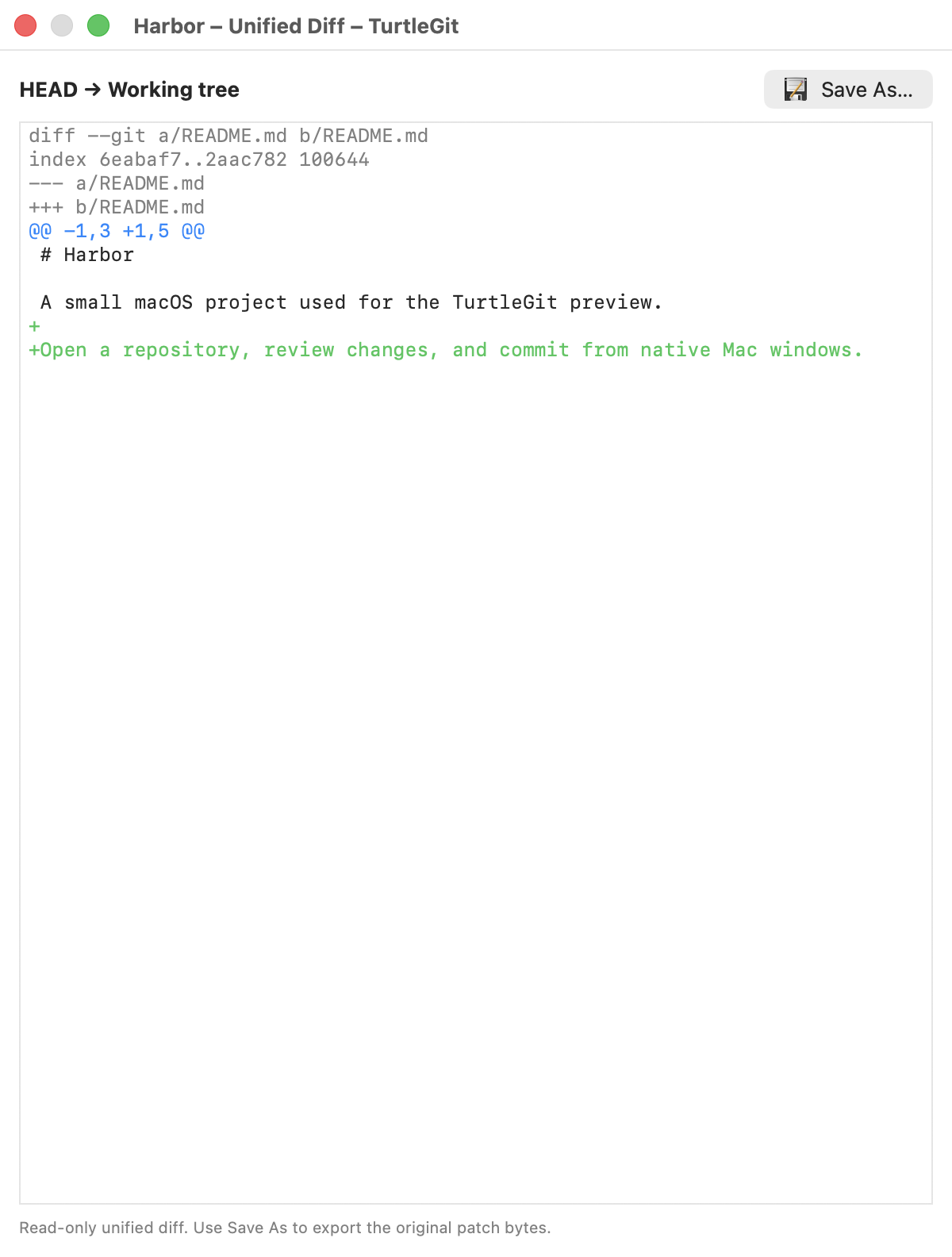
The unified viewer now has appearance settings for all six foreground/background color pairs, separate light/dark palettes, font and tab sizes, and restoring the selected palette. Defaults follow TortoiseUDiff, with Menlo as the native font. Focused persistence/style tests pass. Native settings navigation and all twelve color wells are verified; full layout and live Apply acceptance remain pending. The screenshot above predates these appearance changes.
Unified diffs now offer Print through Command-P, toolbar and context menu, with whole-diff/selected-text choices in a native print sheet. Snapshot isolation and actual selected-text and paginated whole-diff PDF output are verified; Native File-menu Save As/Print, print-sheet Cancel, selection defaults and whole-diff toggling are verified. Signed printer acceptance remains pending.
Unified Diff's Page Setup now saves four locale-aware margins with TortoiseUDiff's one-inch defaults. Native validation, Cancel and save/reopen are verified. PDF checks confirm saved margins affect pagination; physical printer and signed sandbox acceptance remain pending.
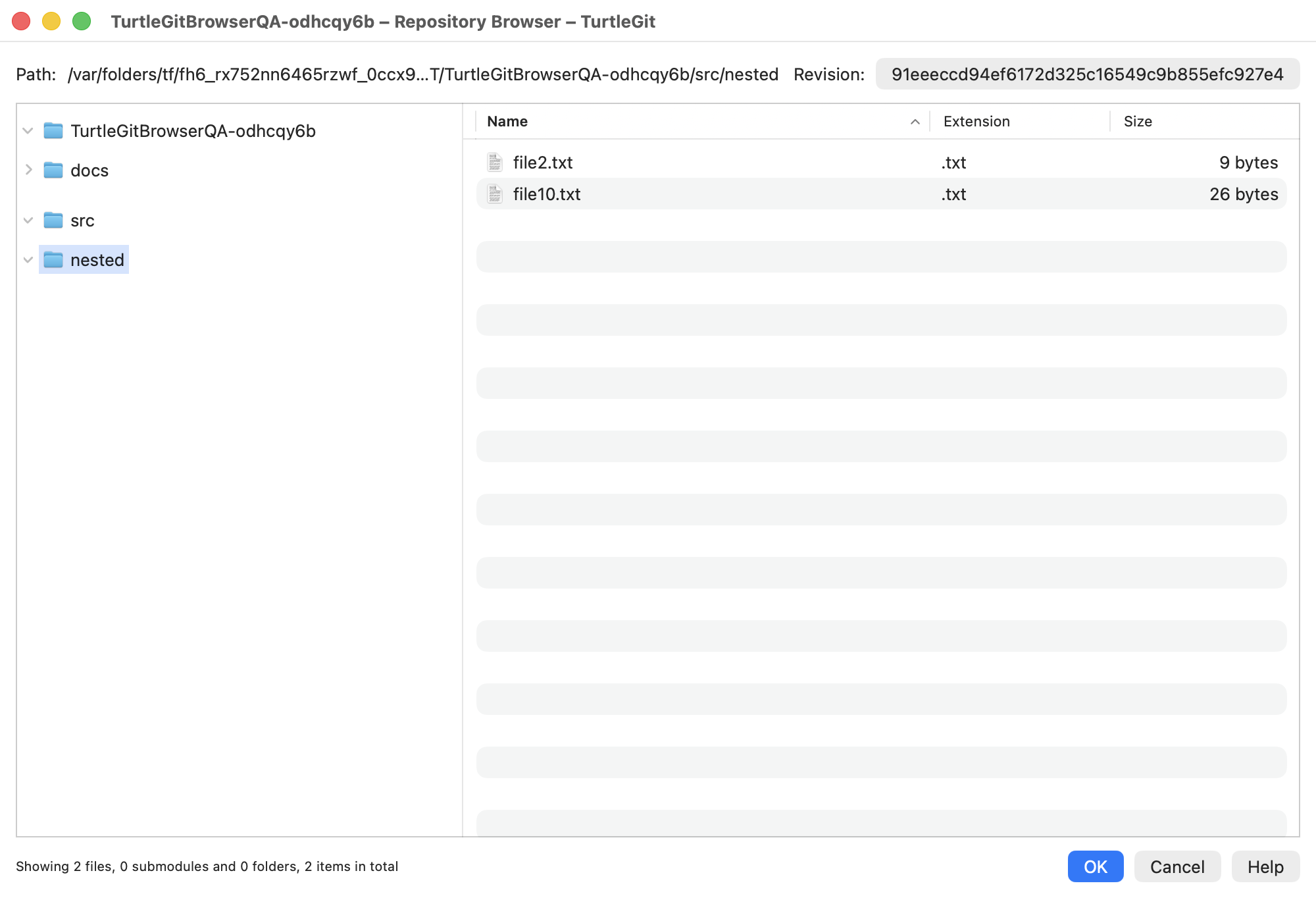
Repository Browser now has the upstream folder tree, revision picker, sortable Name/Extension/Size list and historical file menus with original command and mode icons. It browses pinned nested revisions, including bare repositories and tags, and compares marked files across revisions without checking them out. Revert to this revision restores selected ordinary files into the index and working tree, with per-file Continue/Cancel errors. Gitlinks provide separate parent and child history; child Log uses the displayed gitlink rather than its current HEAD. Historical file/folder drag representations are now provided by the table and folder tree, with native file/folder receiver checks. Actual Finder drops, broader submodule acceptance, broader native acceptance and signed integration remain pending. See Repository Browser parity.
Native historical Blame opens from Log with annotation columns, age colors, revision/author highlighting, a modeless Find panel (Command-F), a native Go To Line sheet (Command-L), origin-aware Show log and Show changes and Blame previous revision with merge-parent choices, plus full log clipboard details. UTF-8 and unambiguous UTF-16 LE/BE sources retain exact historical bytes. An Encoding popup provides explicit UTF and installed legacy code-page choices. Previous-revision Blame retains the applied encoding and whitespace/move/copy options. Five upstream detection modes and separate within-file and between-file character thresholds are available, along with first-parent attribution through merges. Native Blame Settings and viewer controls save annotation defaults for future windows. Font, tab width and separate light/dark age-color settings are available; native font/tab persistence and alignment are verified, while custom color selection and live updates still need acceptance. An embedded revision Log provides Show complete log and Follow renames, with upstream option dependencies and source-line focus. A right-hand Properties pane shows author/committer metadata, full body and parents. A narrow source locator shows whole-file age colors and the current viewport. Previous/Next change actions scroll between blocks of selected revisions without wrapping. Full menus, syntax highlighting and encoding parity remain pending. See Blame parity.
- Open normal repositories and linked worktrees; show branch and status.
- Remember recent repositories with security-scoped bookmarks; renew stale permissions and hold access for the session. Finder requests require an existing grant or a picker.
- Standalone Working Tree status window with upstream column/filter/action layout, original status icons, staged state, file statistics, dates, sorting and context menus. Scope, ignored/unversioned and index-flag filters; unified diff export.
- Stage / unstage selected paths, including before the first commit.
- Separate native Commit window with checked-file selection, message, amend, author,
sign-off, file statistics and icon context menus. Enable staging area switches to
three-state staging checkboxes and commits the index, preserving unstaged edits.
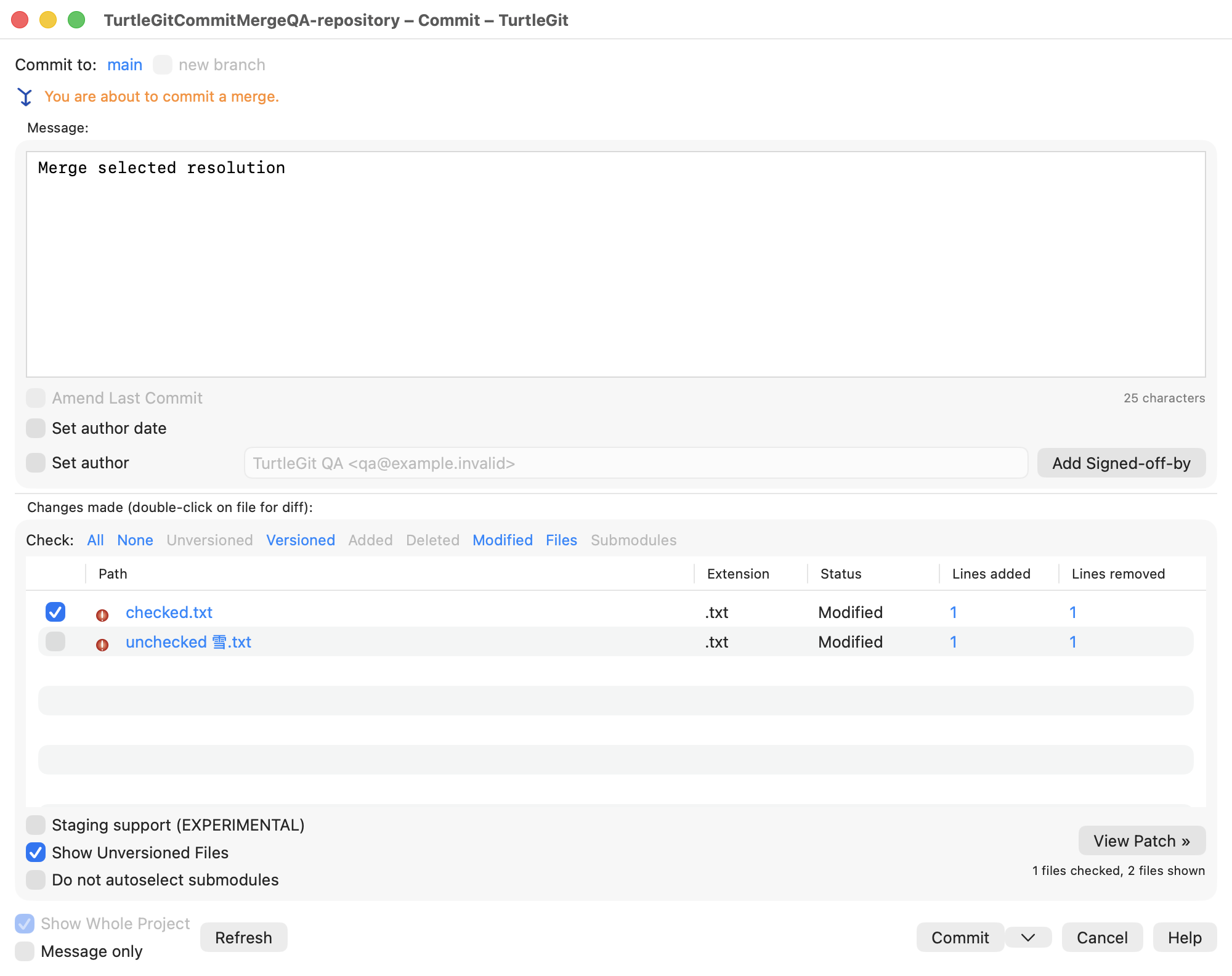
Checked-file mode now completes resolved merges, cherry-picks and reverts using
the selected tree, retaining operation metadata and unchecked index entries.
The configured issue-ID field uses TortoiseGit's top-right layout, repository/
.tgitconfigprecedence, numeric validation, issue-line insertion and ordered missing-issue/template/sign-off warnings. Native cancellation and checked-file commit acceptance preserve unchecked changes. Configured tracker links use bold/italic message highlights in both appearances; Recent messages updates the issue field using upstream rules. Ordinary URLs and email addresses use the upstream punctuation/bracket scanner and native links. Per-line*bold*,^italic^and_underlined_marker formatting follows upstream precedence, with a saved Style commit messages preference. Filename completion includes displayed unchecked files and path suffixes, with Ctrl-Space, original file icons and saved enable/minimum/extension preferences. Shipped/user snippet definitions expand multiline text with original snippet icons, source escape rules and Undo. Code-symbol completion scans displayed files using shipped/private definitions, with source size/time gates and snippet priority. Windows decoder equivalence, complete editor behavior and spelling remain pending; see code-symbol audit. Provider plugins and signed scope acceptance remain pending; see issue audit.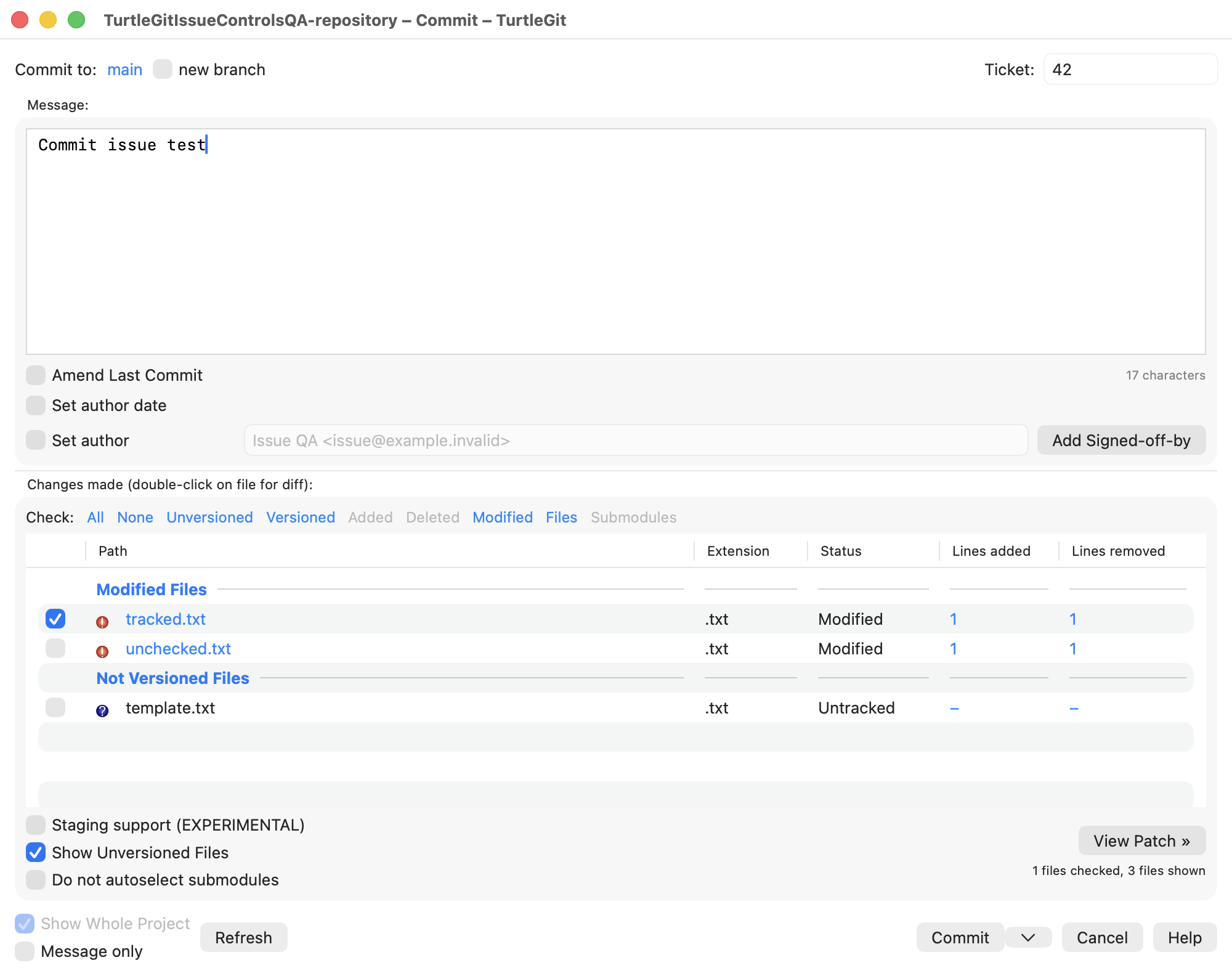
 An attached right-hand patch window stages/unstages selected lines or hunks in
ordinary tracked UTF-8 text files. Restore after commit saves working contents and
restores them after a successful commit, retaining the committed index/HEAD.
Revert resets selected files and index entries, retaining replaced contents in
macOS Trash and leaving added files unversioned. Commit’s Delete context command
moves unversioned files to Trash and stages removal of missing tracked paths;
a separate Shift confirmation supports permanent deletion. Mixed selections use
the marked row to enable Delete; table-focused Delete keys preserve normal text
editing. The clipboard submenu copies the clicked column with the original icon;
Command-C copies relative paths and Shift-Command-C adds status. Double-click
previews untracked files against an empty base without staging them. Compare two
files opens the selected paths side by side, using working contents or pinned
HEAD for a deleted side. Renamed paths
and leading-dot extensions match the upstream display. Changelist creation,
assignment, ignored-file checks and optional successful-commit cleanup are
available, with status/changelist group headings and group check/unstage actions. Broader selection and
signed sandbox checks remain under audit. Highlighted checkbox changes and Space
apply to the highlight; F5 refreshes while retaining the message and checks.
Index-flag menus use the marked file; mixed selections update indexed paths and
report unavailable ones while preserving file contents.
An attached right-hand patch window stages/unstages selected lines or hunks in
ordinary tracked UTF-8 text files. Restore after commit saves working contents and
restores them after a successful commit, retaining the committed index/HEAD.
Revert resets selected files and index entries, retaining replaced contents in
macOS Trash and leaving added files unversioned. Commit’s Delete context command
moves unversioned files to Trash and stages removal of missing tracked paths;
a separate Shift confirmation supports permanent deletion. Mixed selections use
the marked row to enable Delete; table-focused Delete keys preserve normal text
editing. The clipboard submenu copies the clicked column with the original icon;
Command-C copies relative paths and Shift-Command-C adds status. Double-click
previews untracked files against an empty base without staging them. Compare two
files opens the selected paths side by side, using working contents or pinned
HEAD for a deleted side. Renamed paths
and leading-dot extensions match the upstream display. Changelist creation,
assignment, ignored-file checks and optional successful-commit cleanup are
available, with status/changelist group headings and group check/unstage actions. Broader selection and
signed sandbox checks remain under audit. Highlighted checkbox changes and Space
apply to the highlight; F5 refreshes while retaining the message and checks.
Index-flag menus use the marked file; mixed selections update indexed paths and
report unavailable ones while preserving file contents. - Dedicated Revert window with scoped file checks, Select/deselect all, counts, F5 refresh and light/dark appearance; Finder and app-menu routing. Revert parity details record the remaining workflows.
- Optional Gravatar author pictures in Log, with repository-specific visibility, custom provider URL, SHA-256/MD5 and cancellable cached loading.
- Compressed graph expansion with per-commit Expand/Collapse and hollow collapsed nodes.
- Separate three-pane Log Messages window: compact branch/merge graph, refs, full commit message, lazy colored Actions icons, changed paths and added/removed line counts; search/date filters, all-branches and loading older commits; revision and working-tree comparisons. Optional email/committer/date columns and a header menu support saved visibility, resizing/reordering and resetting columns. Settings → Dialogs offers short/long, relative and system-locale date display, with absolute tooltips for relative dates. The upstream Jump dropdown navigates emails, merges, parents, tags, branches (including fast-forward ancestry) and a 50-entry selection history. Refreshing or closing Log cancels its owned history, changed-file and clipboard detail reads. Search offers saved Subject/Message/Paths/Author/Email/Revision/Refname/Tag Info/Notes choices and configured Bug IDs, with a matching issue column. All/Toggle filters, case sensitivity, plain term/exclusion/phrase queries and ECMAScript regex mode are implemented. Author and email searches include committer identities; the message pane also shows commit notes and annotated tag information. Log parity details describe the remaining search modes and native acceptance checks. Full revision clipboard details include notes, tags and paths, with an option to omit changed paths and support for multiple selected revisions. Author and tagger dates use the Log preferences in the message pane and copied details; tag-info searches include the formatted tagger date. Single revisions offer Edit Notes, with exact text preservation and project minimum message length; parity details record remaining checks. Revert from Log offers merge-parent choices and the upstream confirmation/result prompts, with a Commit handoff.
- Log statistics has a native dialog over the shown revision snapshot, author/date choices, lazy file/line calculation and five chart styles with the original graph icons. Options and the last graph page are saved. Save Graph As exports PDF, PNG, JPEG, BMP and GIF; displayed/signed acceptance remains pending.
- Clean has native cleanup type/directory/Trash/dry-run/ Submodules options, remembered repository preferences and a separate progress window with live item progress, Retry and dry-run actions. App commands and Finder's “Clean up…” entry retain selected folder scopes and use the original cleanup icon. Real Trash/permanent cleanup and cancellation are tested; activated Finder handoff, external sandbox grants and displayed/signed acceptance remain pending.
- Original TortoiseGit command icons in app context menus and the Finder submenu; original XPStyle status artwork for Finder badges and app file status. Advanced Settings → ShowAppContextMenuIcons controls app menu artwork while retaining button and status icons. ShowContextMenuIcons separately controls Finder artwork through the shared cache; signed handoff remains unverified; see context-menu icon audit. Finder file/folder, added/unchanged and selection-count conditions now follow the implemented upstream command clauses; full classification remains pending. See path-condition audit. Finder two-file Diff now compares the ordered selected working files directly, including files outside repositories, with independent retained grants. Two-file Diff audit records native/signed gaps. Refreshed registered submodule roots now expose Rename/Remove and route them through the parent repository; submodule root audit records cache and signed-permission gaps. Parent refresh now collects initialized nested submodule caches without opening each child. Cache-tree audit records deinitialization cleanup, retained independent roots and remaining background work. Finder folder creation menus and a toolbar entry point route Clone/Create repository to native dialogs/pickers. Targetless toolbar requests are supported; signed activation remains unverified. See creation audit. Finder commands retain the menu's file/folder selection through activation, including container and nested Ignore entries; see selection audit. Implemented Finder commands follow upstream order and separator groups; Worktrees → Add opens New Worktree. Full conditions/coverage remain pending; see menu layout audit. Cached bare/merge/bisect/stash/submodule facts now filter repository commands; see metadata audit. Full path conditions, fresh background monitoring and signed handoff remain pending.
- Log revision actions for branch/tag, Switch/Checkout, reset, revert without commit, cherry-pick, and copying hashes/messages/details. Advanced options remain pending.
- Commit’s file menu adds unversioned paths explicitly; Shift reveals upstream executable/symlink index-mode choices without modifying working-file contents. Checkbox Commit retains explicit staged modes while reading later working edits.
- Commit’s separate editor command uses TextEdit or a saved custom macOS app, configured in Settings → Alternative Editor, with the original editor icon.
- Commit file Export uses the original icon and a native folder chooser, preserving relative paths and exact working contents without staging or committing files.
- Ordinary file Diff from Finder requests, app menus, Commit and Working Tree routes to the native two-pane viewer, comparing HEAD with working contents including staged edits. Folder Diff opens Working Tree; Log changed-file comparisons and double-click also open native viewers. Unified/index diff inspection remains available. Explicit untracked files compare with an empty base without staging them. Commit comparisons follow the selected HEAD/first-parent amend mode. Log file-history actions open scoped native history; clipboard menus offer full paths, relative paths, names and displayed file information. Historical blob extraction is byte-preserving. Native Save As acceptance is verified for a committed text blob with BOM and CRLF while retaining different staged and working contents. Earlier intermittent panel failures and further export variants remain under investigation. Historical Open, Open With and alternative-editor commands use read-only temporary copies; native editor-document acceptance remains under audit. See Log parity.
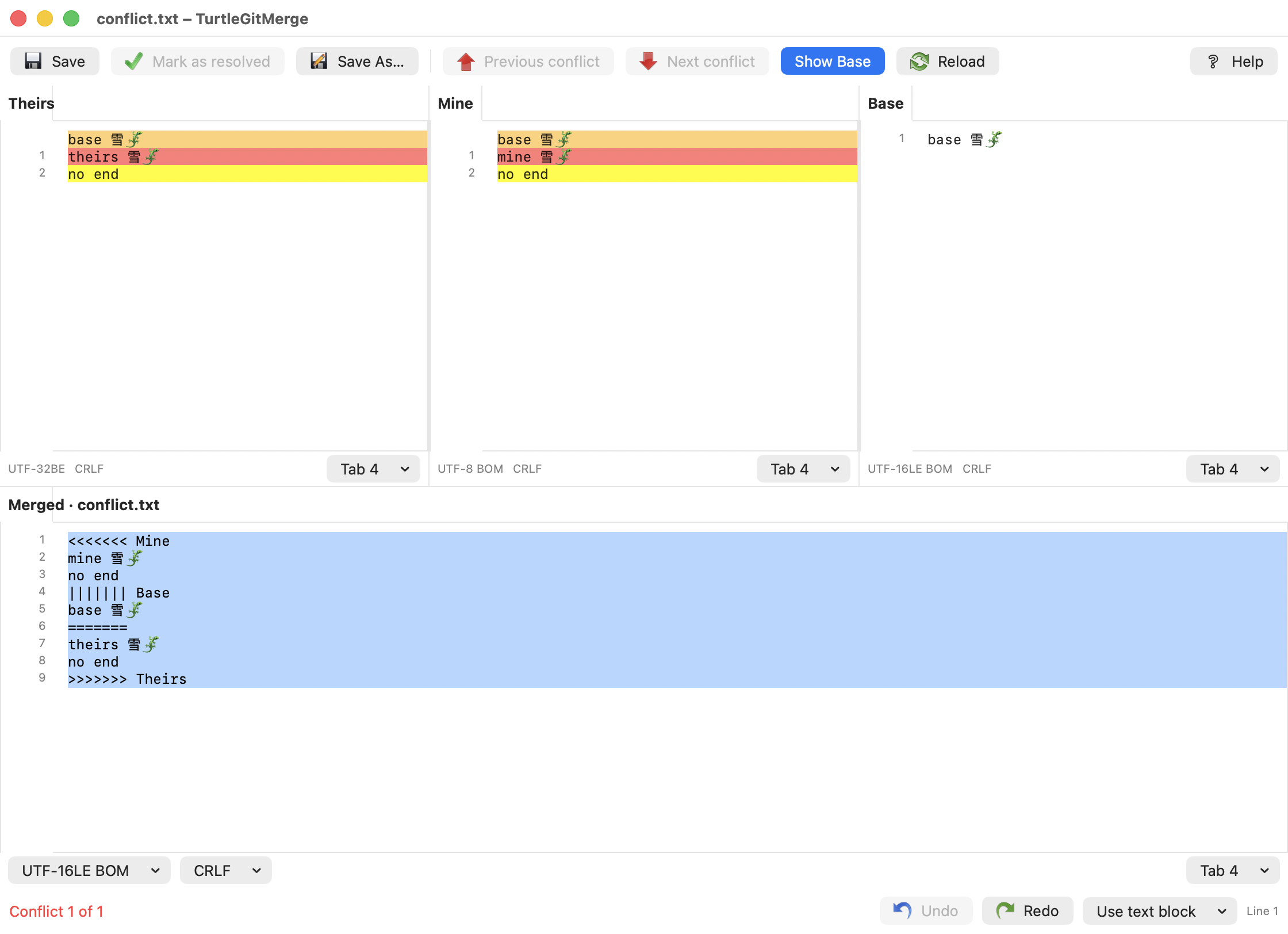
- Native three-pane Unicode text conflict editor with Theirs/Mine/Merged, block choices,
aligned source rows and colors, original line numbers, undoable whole-source
selection, Reload, explicit output encodings and guarded Save/Mark as resolved. Full editor parity and native QA
remain in progress; see Text merge parity.
- Native Merge window with branch/tag/commit selection, squash, fast-forward, No Commit, message summaries, strategy controls and custom messages. See Merge parity.
- Native Stash Save window with an optional message, mutually exclusive include-untracked and --all options, and the upstream Abort/Continue warning workflow. Stash parity records remaining work.
- Stash Apply/Pop run directly with native progress and success/conflict prompts. Yes opens Working Tree; failed Pop retains its stash for recovery.
- Native RefLog and Stash List window with upstream columns, reference selection, Find Next, selected Apply, inspection and guarded stash deletion/clear. RefLog parity records remaining work.
- Native Clone window with depth, recursion, bare/no-checkout, branch/origin, OpenSSH-key and SVN option groups, Retry and Log/Finder post-actions. Real Git and native shallow-branch clone checks pass; Clone parity records remaining work.
- Native Create Repository window with the upstream Bare option, destination warnings and preserved existing contents. Bare repositories open in the workspace and Log; worktree-only actions are disabled. Create Repository parity records picker, signed integration and remaining native verification.
- Log revision context menus now hand Merge/Rebase selections to native dialogs with original icons, branch/tag/hash presets and fresh state checks. Log Merge/Rebase.
- Bisect has a native two-field start window with editable references and Log pickers, Stash/Abort, original continuation icons and recoverable Git progress. Finder Start/Good/Bad/Skip/Reset now use fresh session state and original icons. Submodule Update availability follows each checkout and requires successful, idle progress. Log revision menus provide two-row Start, selected Good/Bad and multi-Skip. Participating modal Log pickers refresh after Bisect results and detach on close. The Log working-tree row now supports comparisons, Commit and current-commit Bisect Good/Bad/Skip/Reset, plus Stash/Pull/Fetch/Submodule Update handoffs. Selected versioned files support unified diff against HEAD with rename paths, raw patch bytes and alternate viewer handoff. Working-file Open/Open With/editor use the actual disk file; Save As and Export copy current bytes, including unversioned files. Two-file comparison uses HEAD for missing disk sides. Prepared comparison supports working/historical files in either direction and retained Finder marks. Working-row Blame annotates a freshly pinned HEAD, matching upstream; new/unversioned files are excluded. Conflicted working files offer Edit Conflict and Resolved/Mine/Theirs through existing native editors and Resolve; single-file primary action opens the editor. Advanced working-file actions and displayed/signed acceptance remain pending. Bisect parity.
- Log revision Export now opens a native ZIP/revision/Whole Project dialog and uses Git archive with overwrite confirmation. Repository and Finder folder/bare entry points share the dialog. Signed sandbox and displayed verification remain pending. Revision Export.
- Separate native Rebase window with ordered Pick/Skip/Edit/Squash actions, original action icons, branch/upstream/onto controls and lower file/message/progress tabs. Multiple selected rows move together, with Shift-to-end and focused-list action shortcuts checked through a headless native receiver. Squash groups pause for multiline message approval and apply the first/latest/current author-date setting. Squash workflow. Edit uses multiline approval, and Split reuses full Commit selection with partial-history recovery. Cancelling an unstarted Split preserves an applied conflict Edit pause and its message. Edit/Split workflow. Conflict Files now retains resolved changes and routes native conflict editors and Resolve commands. Pick/Edit Continue commits checked files and recovers remaining changes through native Commit amendment sheets. Squash conflicts list the whole group and continue through combined-message approval. Empty groups offer Commit/Skip/Cancel with recoverable Skip, including linked worktrees. Configured Git reference updates follow group results and original rows through repeated Add. Repeated conflicts preserve all group messages; checkbox acceptance remains pending. Squash conflicts. Conflict workflow. Empty Pick/Edit results offer Commit/Skip/Cancel, and conflict-message hints offer Ignore/Abort. Empty-result workflow. Rebase rows now provide native Log inspection, reference, notes and clipboard commands with original icons. Row menus. Custom replay lists retain completed rows and recover actions, occurrence IDs and progress when reopened. Replay rows. Successful Rebase offers Show Log/restart and after-Fetch Push/mail controls. Completion actions. Active session metadata restores original options and Fetch/Pull origin after reopening. Session context. Native Start/Skip selection and recovered Edit/Amend were exercised; full recovery UI remains pending; Pull/Fetch handoffs were verified. Rebase parity.
- Native Cherry Pick plans from single/multiple Log selections, colored action icons, Pick/Skip/Edit/Squash, ordering, Add via multi-select Log, merge-parent prompts, attribution and recovery. Displayed acceptance and advanced controls remain pending. Guide, parity audit.
- Follow System, Light and Dark appearance choices, with upstream file-status colors and original colored artwork. Appearance audit.
- Native New Branch/Tag windows with HEAD/branch/tag/commit selectors, descriptions, annotated tag messages, force, remote tracking and optional branch checkout. Tag Push opens native Push options scoped to the new tag. Branch/tag parity tracks remaining options.
- Separate native Pull dialog with remote/branch selectors, squash, no commit, fast-forward controls, Tags/Prune and shallow depth. Owned progress retains the result with old/new Compare and Log, conditional Stash Pop/Push, and conflict/recovery actions. Pull parity records pending rebase and recovery workflows.
- Commit’s split button restores and repeats the last selected action; Rebase split commits force Commit and preserve that preference.
- Dialogs settings adds the source manual/no-options/no-errors progress close policies for seven native command workflows; progress parity records remaining coverage and acceptance.
- Native Commit progress retains ordinary results with Push, Pull, ReCommit and Create Tag; cancellation covers owned Git and hook processes. Physical and signed acceptance remain pending; see Commit parity.
- Separate native Fetch dialog with named remote/all remotes or URL, remote branch browsing, three-state Tags/Prune overrides and shallow depth. Owned ordinary Fetch progress retains results with Log, Reset, Fetch, Rebase, Switch and captured Retry actions; all-remotes failure also offers Log. Fetch → Rebase adds upstream up-to-date/unchanged/fast-forward choices with remembered answers, real ff-only Merge and configured automatic handoff. Fetch parity records remaining work.
- Separate native Push dialog with reference/destination selectors, force with lease, tags, upstream tracking, per-branch defaults, submodule recursion and server option. Push parity records remaining work.
- Pull/Fetch/Push transport cancellation and editable histories, including immediate Shift+Delete history removal. Pull/Fetch share saved entries; Push keeps them per repository. History deletion records native/model evidence and pending physical keyboard/popup acceptance.
- Separate native Switch/Checkout dialog with branch/tag/commit selectors and create-branch, force, merge, three-state remote tracking and branch override. Switch parity details document pending chooser and UI work.
- Finder extension target with status badges, directory status aggregation, TurtleGit context submenu, and complete multi-selection URL dispatch. File/folder selections scope Diff and Log; Show Whole Project restores unfiltered history.
- Native Rename dialog with original context-menu artwork, versioned-file menus in Commit/Working Tree and Finder dispatch. Real Git tests preserve mixed changes and reject occupied/outside destinations. Rename parity.
- Native Delete / Delete (keep local) confirmation and per-item Ignore/Abort handling, original artwork and Finder dispatch. Retained copies survive selective commits and amendments. Delete parity tracks remaining QA.
- Native Ignore dialog with upstream scope/destination radios, name/extension rules, per-folder and linked-worktree excludes, original artwork and Delete-and-ignore keep-local prompts. Ignore parity records remaining QA.
- Native Resolve checked list and current/mine/theirs actions with original artwork, scoped conflicts and rebase-aware labels. Resolve parity records verification and the remaining conflict editor/submodule work.
- Dedicated native Reset dialog with Branch/Tag/Commit, Soft/Mixed/Hard and submodule resolution handoff. Reset parity records the verified Git effects and remaining native/progress work.
- Native delete/modify Conflict dialog with Modified/Created, Delete and default Abort, side history and base comparison. Conflict parity records native keep behavior and remaining editor/QA work.
- Upstream file and dialog inventories pinned to an exact commit.
These are initial workflows, not full upstream parity. The operation dialogs expose only the options shown. Log parity details track the upstream controls and context commands still missing. Checkbox mode commits the current whole-file contents of checked paths; staging mode commits all staged changes, including files outside the current view. Highlighted rows do not select commit contents. Commit parity details track remaining options. Authentication uses existing credential helpers / SSH configuration; there is no native credential prompt yet. Commit's cancellable progress window and interactive hook/editor/signing prompts remain incomplete; cancellation in other operations is tracked in their individual parity documents. Conflicts remain visible in the status list. Regular Unicode text conflicts can be resolved in the native three-pane editor; unsupported formats still require another tool. The merged result offers the upstream nine-style line-ending conversion submenu with Undo/Redo, plus UTF-8/UTF-16/UTF-32 output choices and explicit Windows-1252 export. Each pane has an optional EditorConfig toggle that reads the bundled official parser and applies tab width and Tab/Space settings with an EC status indicator. Merge Editor Settings can enable it by default for new windows. It applies indentation settings; saving retains the chosen pane format, matching the pinned upstream callers. Signed sandbox acceptance remains in progress; see EditorConfig audit. Legacy input code pages and full diff/merge parity remain in progress.
The future user manual follows TortoiseGit’s structure and terminology with macOS-specific instructions and real TurtleGit screenshots.
Fetch can now open a native Rebase plan for its selected branch. A rebase-configured Pull follows Fetch → Rebase and starts automatically; see Rebase parity for verified behavior and remaining differences.
The native submodule Conflict chooser now shows checkout-based Base and destination revision/subject/type details, with side history and Use this choices. Submodule Diff and Changed Files parity records the native comparison windows, immutable revision comparisons, post-Revert submodule handling, the native Base/Theirs file viewer and remaining comparison actions. File double-click opens colored, aligned panes with Find and difference navigation; unified patch is available separately. The two-file viewer supports explicit working-file editing and guarded Save; historical sides stay read-only. Use other block/file, both block orders, Undo/Redo and pane-specific Save As are available. Pane context menus also apply selected line ranges and offer Copy/Cut/Paste with alignment gaps excluded. Mark/Unmark and Leave only marked blocks preserve marked and manually edited lines, with original gutter icons and Undo. Inline character/word differences use the upstream light/dark colors and missing-text markers; normal Log comparisons open Changed Files. Full TortoiseMerge parity remains in progress. Submodule Update parity records the native selection/options window, real Git behavior and remaining progress/Finder checks.
Submodule conflict parity records remaining edge cases and native QA. The Git integration suite runs in CI. Submodule deletion offers Delete/Abort and preserves the complete checkout in macOS Trash. Monochrome Log, Help and cherry-pick icons adapt to light/dark appearances.
Log's selected-file menu supports historical folder Export with original artwork, subfolders and pinned committed bytes. Native export, Ignore/Abort and chooser Cancel preserve repository state; overwrite and signed sandbox checks remain pending. Reveal in Finder selects the current disk item or opens its nearest existing parent when the historical path is absent, without checking out a file. Both native reveal routes were verified.
Mark for comparison retains a path and revision within the Log dialog. Compare with opens a read-only viewer for the same path at another revision or a different historical path. Both native routes were verified with exact repository state preserved. External working-file marks, gitlinks and long-path menu-label compaction remain under audit.
Working-file marks persist across app launches and compare files in separate locations through the native viewer. App and Finder request routes are wired; a persisted-mark request and editing toggle were verified natively. Finder extension clicks, direct menu chooser handoff and signed sandbox checks remain pending. Log also imports an external mark and compares live working bytes with a pinned historical file, retaining the mark within the dialog after shared consumption. Native working-file comparisons now keep separate Base/Mine drafts and Undo histories. Save targets the active pane; Save on close writes both dirty files, preserving encodings and permissions. These routes were verified with repository state unchanged. Historical-copy editing and signed access remain pending. See comparison mark parity.
Compare two files uses the selected commit's first parent independently for deleted sides. Multi-file unified diff appends patches in displayed order and includes both names of a rename. Core regressions pass; native pair and multi-file patch acceptance, merge-parent variants and signed sandbox checks remain pending. Log’s Walk Behavior menu now provides First Parent, No merges, Follow renames, Full history, Compressed Graph and labeled-only choices. Display filtering retains actual parents for revision actions. Ordinary path history uses Git's rewritten graph links to connect omitted ancestors, with real parents retained for file details and revert targets; per-node rollup and displayed acceptance remain in progress.
Log’s View → Labels menu provides per-repository Tags, Local branches, Remote branches and Other refs switches. They update label rendering and the compressed/labeled graph while preserving reference metadata for actions.
Log’s View menu also offers Hide/Gray Unrelated Changed Paths, with Gray enabled by default, and Show Unversioned Files. Historical and working tracked rows retain unrelated paths for these controls; status colors now distinguish changes.
View Patch now opens a read-only native panel that follows revision/file selection, clears on multi-selection, preserves raw patch bytes, and reopens from the repository setting. Stale reads are canceled when selection changes or Log closes. The panel remains usable when saving that setting fails, and rapid toggles save the final choice in order. The panel aligns beside Log, follows movement/resizing while docked, and can be dragged away or snapped back.
See Log parity for source audits and verification limits.
Dialogs settings also includes TortoiseGit's Display branch revision number: first-parent counts appear in Log's first graph lane and after single-source Push. See Push parity for verified scope and remaining work.
Create pull request… now opens a native Request Pull dialog with upstream's Start/URL/End fields, saved histories and Log selection. Git generates pull-request text through an owned waiting window, then the configured Alternative Editor or reviewed Send Mail options. Git/SSH askpass inheritance covers the advertised repository check. See Request Pull parity for verification and remaining acceptance.
Native Push now retains a separate result with TortoiseGit's ordered follow-ups: Request Pull, Push, Switch, superproject Commit, and Pull/Fetch after rejection. See Push parity for captured presets, close policies and limits.
Reset now retains an owned result with Retry, Submodule Update, bisect and Clean follow-ups, and follows the shared automatic-close setting. See Reset parity for verified scope and remaining physical/signed acceptance.
Clean results now follow source-specific close policies and cancellation, with ordered original-icon actions. See Clean parity.
Stash Apply/Pop now has verified result modes, remembered Pop answers and guarded once-only Working Tree handoffs. See Stash parity.
Format Patch now follows shared progress close/cancellation settings and guards result-to-mail acknowledgement. See Format Patch parity.
Export now retains a native result with the original Explore icon, shared close settings and cancellation confirmation. See Export parity.
Branch creation now uses native Switch recovery before saving its description; tag Push keeps captured intent. See Branch/Tag parity.
Switch/Checkout now shares captured native progress, recovery actions and cancellation confirmation with express Switch and branch creation; see Switch parity.
Clone now owns a native result with captured Retry, Log/Finder actions and process cancellation confirmation; see Clone parity.
Clone displays live command output and transfer percentages using upstream-style CR/remote-line handling and output limits; see Clone parity.
Selected-file comparisons share captured source-window, question, cancellation and Quit ownership across preparation and viewer handoff. Log parent groups confirm together; aggregate GNU patches remain single viewers. Historical blob loading in the child viewer also participates in this ownership. See comparison launch parity for source rules, route coverage and remaining acceptance.