 TurtleGit for Mac
Appearance and color parity
TurtleGit offers Follow System, Light and Dark in Settings and the Appearance menu.
The choice is saved for the app and applied to AppKit and SwiftUI windows through
NSApp.appearance. Follow System removes the app override. Finder's appearance is
controlled by macOS; the app's preference does not change Finder or system settings.
The patch and comparison appearance family tracks embedded Commit patch inheritance, the complete editor canvas and per-window comparison palettes. Its verification boundary is recorded separately from the earlier screenshots below.
Use the official dialog screenshots alongside the pinned source/resource layouts when reviewing every replacement. Native controls should retain upstream's semantic colors, recognizable artwork, list density and layout. A single accent color is not a substitute for those distinctions.
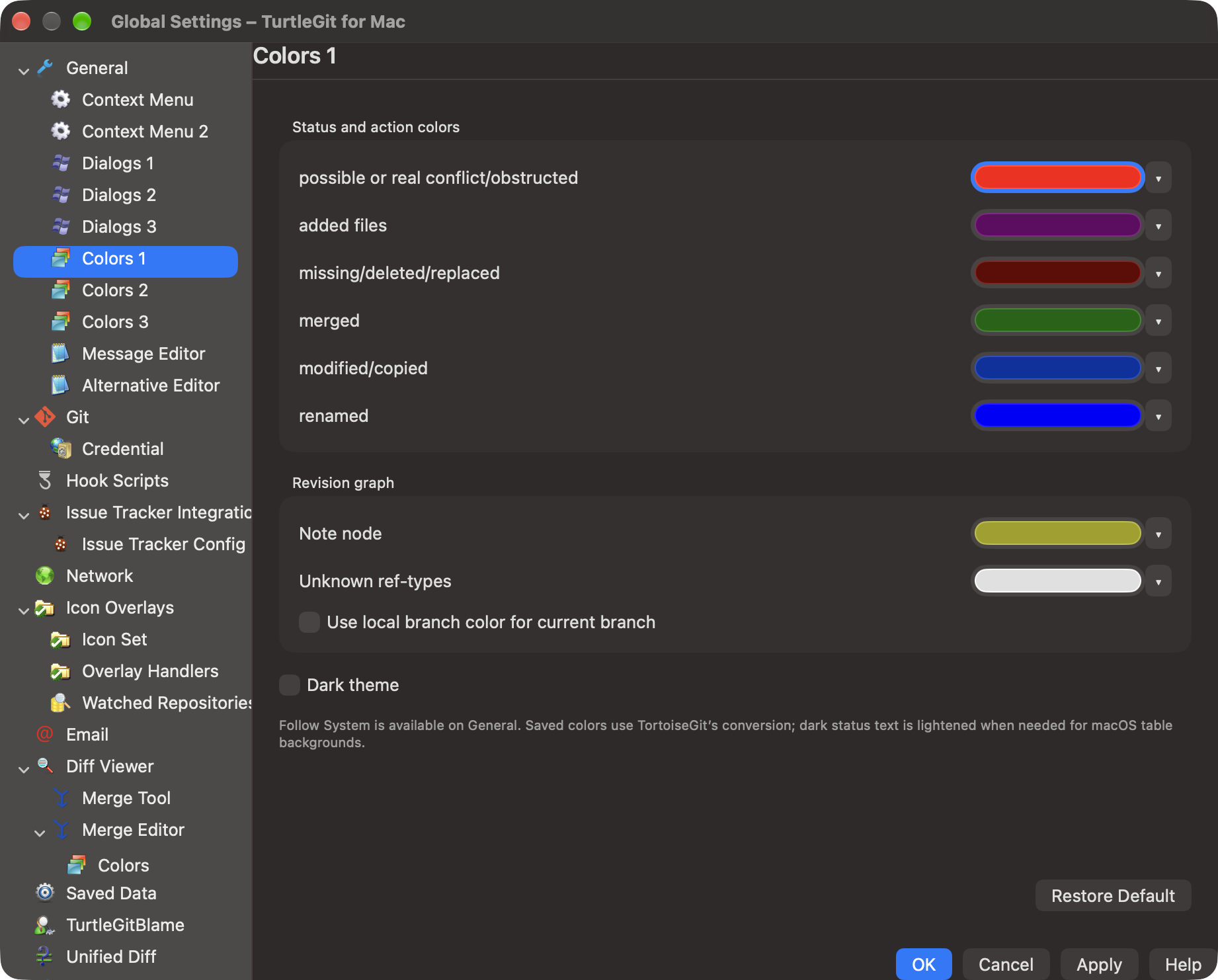
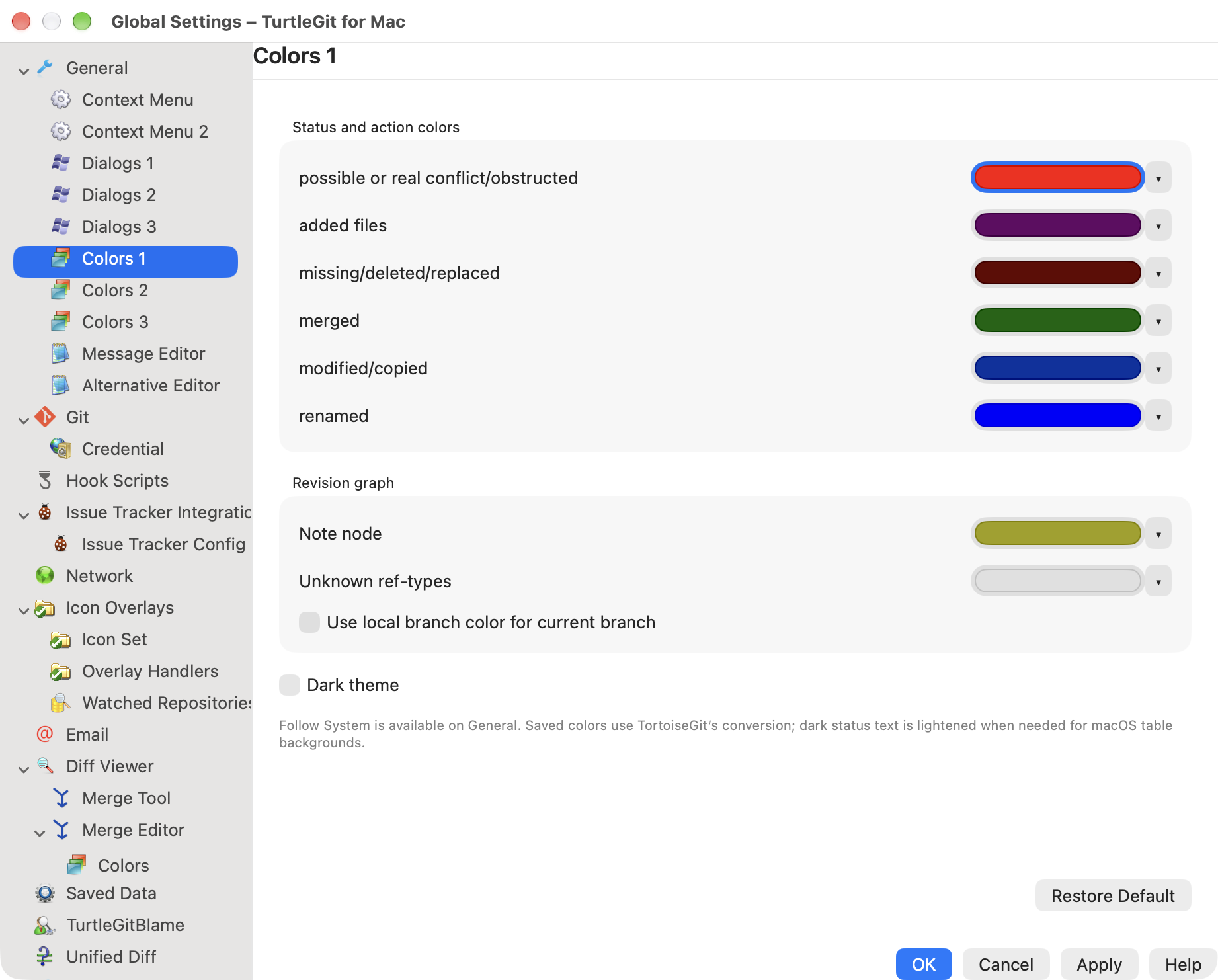
The file-status defaults now use the pinned CColors RGB values: modified (0,50,160), added/copy (100,0,100), deleted (100,0,0), conflict (255,0,0), renamed (0,0,255) and merged (0,100,0). Native dynamic colors follow the source HSL lightness inversion for dark appearance, including its 5–90 lightness clamp; high-contrast dark uses the source's unclamped inversion when macOS Increase Contrast is enabled. Neutral normal, unversioned and ignored records use native label text. The source's explicit GRAY action is a separate Log-filter condition and is not inferred from ignored working files. Merged is retained as a palette role; porcelain working statuses do not provide a separate merged action.
Commit and Working Tree apply the action color to every text column, including line counts, metadata and the optional owner column. Combined index/worktree actions use source priority: conflict, modification/type change, added/copy, deletion, rename, then neutral. A renamed file with further modifications is therefore modified blue. Selected rows use native semantic primary text across all columns. Original icons and status words remain visible. The Log changed-file table also reads saved colors for all five text columns, including rename/copy scores and type changes. Its Gray unrelated-path mode uses native secondary text before action colors; selected rows use primary text. The Log view subscribes to Apply notifications. Other FileState consumers share the exact default roles, but their complete action/selection behavior still needs individual source review. Graph lanes and branch/tag labels use multiple colors; the patch view distinguishes additions, removals and hunks. Log reference roles and graph colors are described below. Other CColors consumers and the filter-match setting remain pending.
Status color QA compares numeric RGB values and Aqua/Dark Aqua/high-contrast dark AppKit resolutions against independently compiled pinned C++ conversion functions. It also checks mixed action priority and the selected semantic color. These checks do not prove current pixels, selected-row contrast, accessibility or visual parity in every dialog. Existing screenshots below predate this palette change and have not been refreshed.
The Rebase port adds five byte-exact original assets for Pick, Skip, Edit, Squash and branch/upstream reversal, with provenance hashes. The icon suite renders all all recorded resources through AppKit. Rename adds the original menurename artwork. The upstream license notice remains in the bundle.
Actual light/dark Commit and Rebase captures use disposable repositories. Initial light/dark rendering and live Settings switching Light → Dark → Light → Follow System were verified. Comprehensive switching across every open window, selected-row contrast, accessibility contrast settings, Finder appearance and every other window's visual comparison remain in the UI parity audit. User-selectable status palettes are now editable for the six status roles below; the complete upstream Colors settings remain partial.
Original Log and Help icons are monochrome at every embedded size. They now use native template tinting alongside cherry-pick; the shared SwiftUI command label respects template images while preserving all colored artwork. The updated native submodule dark capture verifies readable Log/Help shapes and green Fast Forward types. The byte-exact source ICO files remain unchanged.
Editable status colors
Settings → Appearance now includes Added, Deleted, Merged, Modified, Conflict and Renamed color wells, each with Default, plus Restore Defaults, Cancel and Apply. Edits, per-color Default and Restore Defaults affect a draft; Apply saves the six colors. Cancel discards the draft. Reopening loads the saved choices. The appearance choice and unrelated Note/OtherRef/graph preferences are preserved. Modified is also saved to the PropertyChanged alias, following the source Apply handler. Mac preferences use validated opaque packed 0xRRGGBB values rather than Windows registry COLORREF byte order. Invalid saved values fall back to defaults.
The chosen light-mode RGB feeds the same source dark/high-contrast conversion. Open color-consuming SwiftUI views and native list adapters subscribe to Apply notifications; newly constructed colors read saved preferences. A selected row keeps semantic primary text regardless of the saved status color.
Color settings QA records independent C++ checks for custom RGB/black/white and clamp endpoints, native color-well binding, AppKit action targets, private preference round trips, draft/Cancel/ Default/Restore semantics, validation, alias and notification assertions. Live recoloring across every already-open application window, shared color-panel interaction, current pixels/contrast and signed deployment remain unverified. Note/OtherRef controls and Log graph settings are now provided by the Log tab below. Full upstream Colors page parity and remaining consumers are still pending.
Log status-color QA checks the real historical and working-tree path/filter fixtures with Apple and bundled Git, saved custom Modified/Renamed colors, gray/selection precedence and unchanged HEAD/index/file bytes. The dedicated palette receiver checks action mapping including T/K and scored R/C records. These checks do not prove displayed Log repaint, physical selection contrast or visual parity; filtered/compressed graph topology, physical raster/gradient parity and reference-label shape/tracking remain separate pending work.
Log labels and graph
The Log now uses the pinned colors for CurrentBranch, LocalBranch, RemoteBranch,
Tag, Stash, BisectGood/Bad/Skip, NoteNode and OtherRef. Reference labels have
opaque backgrounds, with white or black text selected by the source's weighted
RGB threshold. Colors adapt through the same dark conversion as file statuses.
The former generic translucent red/yellow/orange/green labels are removed.
Bisect term boundaries and custom good/bad terms are read from an active session.
Native Colors.BisectSkip is distinct from Colors.BisectBad; upstream's
BisectSkip registry entry accidentally repeats the Bad key. Windows registry
preferences are not imported.
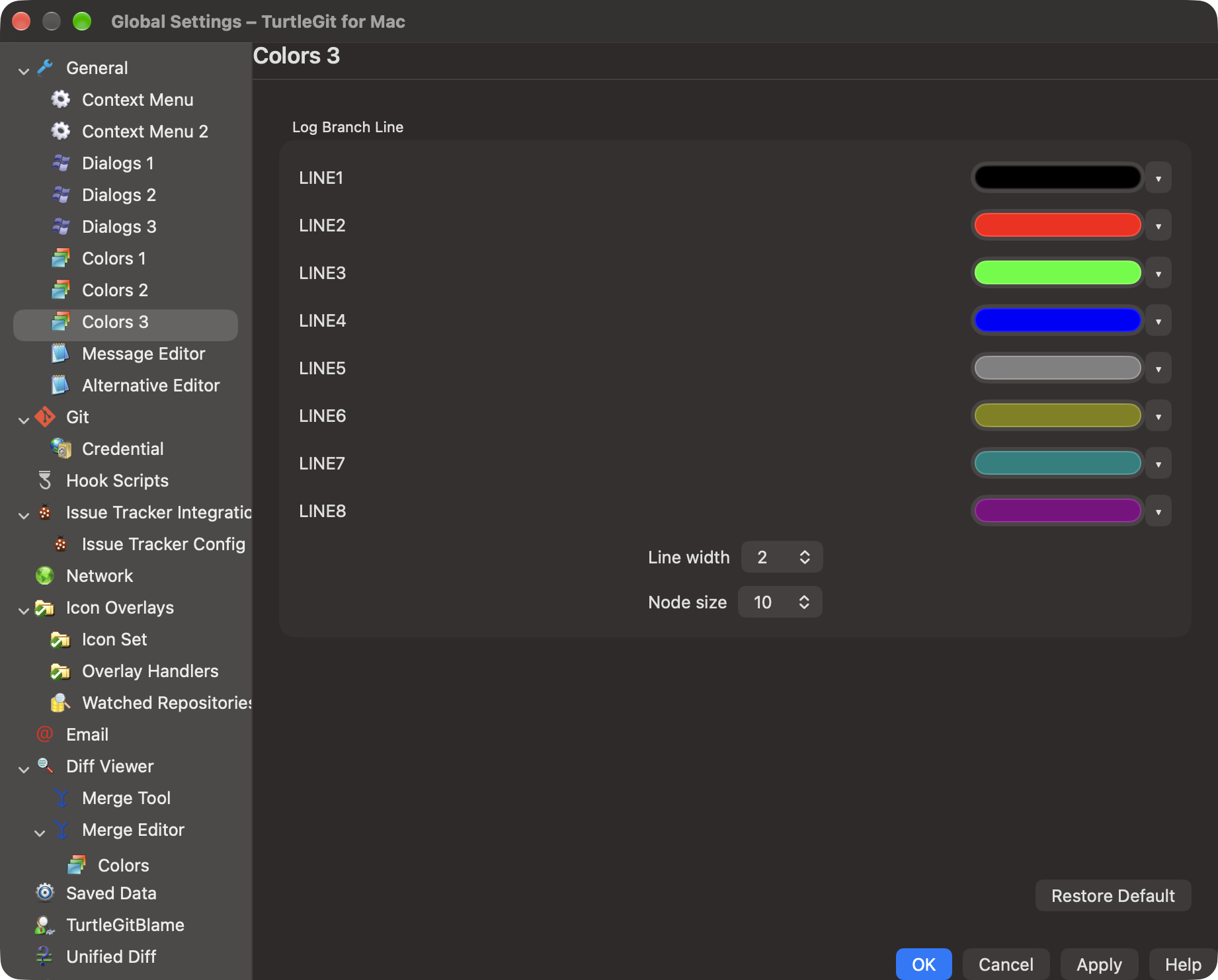
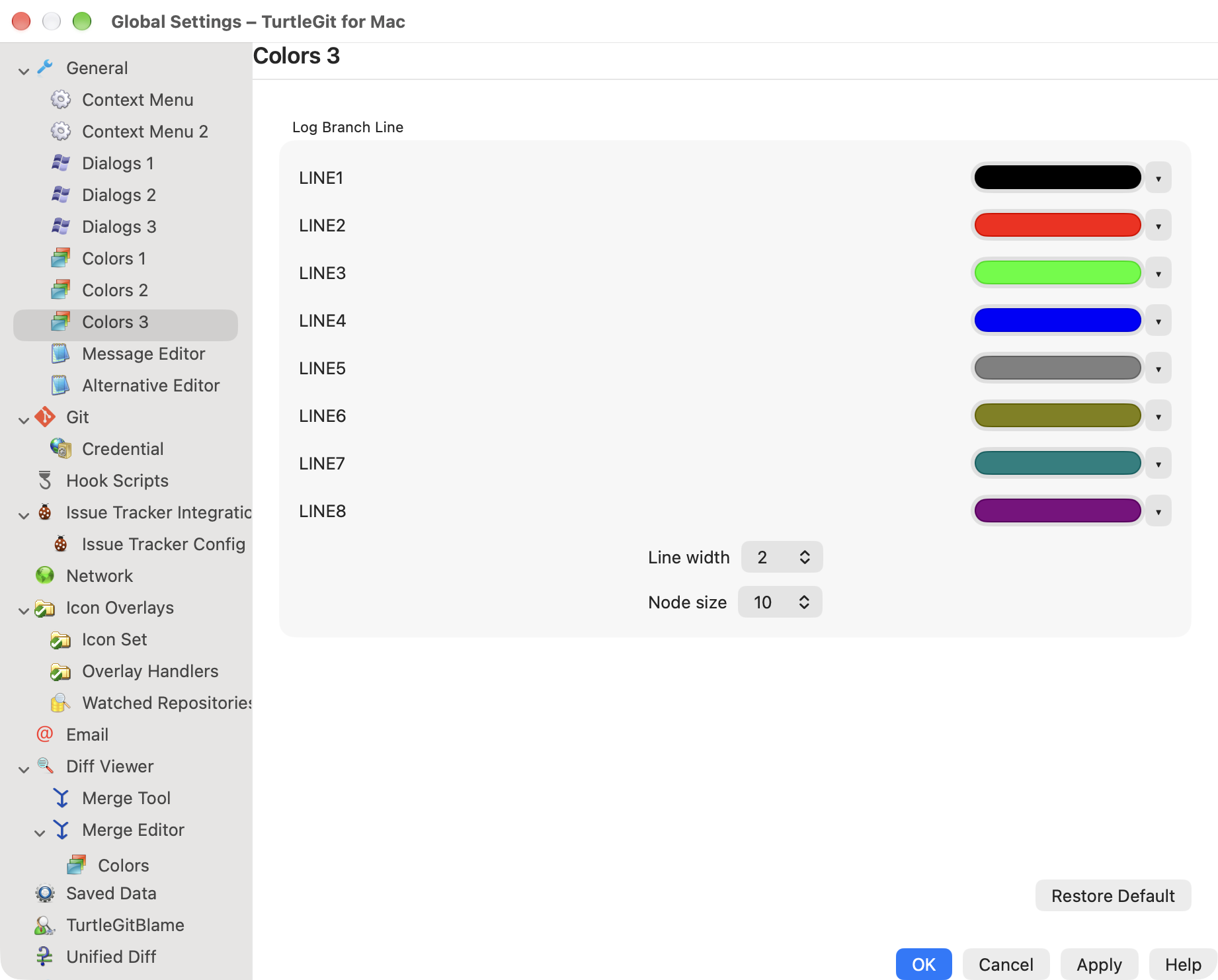
Settings' Log tab provides six reference color wells and eight branch-line color wells, per-color Default, draft Cancel/Apply, Restore Defaults, line widths 1–10 (default 2) and node sizes 1–30 (default 10). Stash/Bisect custom values and unrelated status preferences are preserved. Restore resets this tab's editable colors and geometry, matching the source defaults. FilterMatch and revision-graph "use local color for current branch" are not exposed until their consumers are ported. Native reference/graph settings combine the relevant source pages; the exact source page grouping still needs review.
The graph cycles through the eight source BranchLine colors. Its lane width is three quarters of row height and node radius is the integer lane width times node size divided by 30. Line width uses the saved setting. Native graph drawing now uses the source lane state machine, retains empty slots, colors by lane index and routes join/tail arc gradients from the active merge lane. Source horizontal/vertical line and circle/square/rolled/boundary shapes are adapted to Core Graphics. Compressed/labeled visibility now preserves each raw row's lane snapshot, advancing through hidden commits as upstream append does. Physical raster/Retina/gradient parity and full Git path/walker metadata equivalence remain pending. LogIncludeBoundaryCommits now loads excluded endpoints and carries their minus marks into the source boundary lane states. The revision table reloads existing cells after Apply while retaining selection and scroll state through the existing update logic.
AppKit on this host resolves named accessibility appearances to ordinary
Aqua/Dark Aqua when system Increase Contrast is off. bestMatch therefore cannot
by itself prove high-contrast color resolution. Color providers now read the
actual macOS Increase Contrast flag, and consumers observe accessibility display
option changes. The independent C++ oracle verifies unclamped numeric conversion;
physical acceptance with the system flag toggled remains pending. Earlier QA
records mentioning named high-contrast native appearances are historical and
do not establish system-enabled high-contrast behavior.
Log palette QA records oracle comparisons, private preferences and hidden native settings/revision-table acceptance. No new screenshot or physical/signed acceptance is implied.
History lane QA compares 1,623 exact Swift
lane-type and active-column snapshots across 86 deterministic DAGs with the
compiled pinned C++ Lanes and CLogDataVector::updateLanes. The test compiles
those state/update bodies verbatim with portable hash/record adapters. Core
projection checks retain actual action parents, merge identity in first-parent
mode, and blank synthetic working-tree graph rows. Empty slots remain between
disconnected histories, as upstream does. Existing abstract edge data is kept
as a parent-connectivity API; native drawing uses the new lane-state data.
Shared GraphCell also invalidates on saved color/accessibility revisions, so existing Log and Blame cells can repaint without replacing the cell. Hidden native drawing acceptance and its limits are recorded in the QA file. No current screenshot or physical visual parity is implied.
History projection QA checks the pinned visibility/forced-rollup/filter walk against Core projection, including complete, compressed and labeled views, label masks and forced overrides. Collapse/Expand is also available in the complete graph, matching upstream FILTERSHOW_ALL. Hidden commits advance the lane machine; display-parent bridging remains the separate compatibility edge API and does not replace painted lane snapshots. Changing label visibility with forced states reloads the projection in complete view. Actual action/detail parents remain untouched. Search/path revision-walk metadata and physical graph pixels still require separate acceptance.
Status/file tables now honor LogFontForFileListCtrl, independently of the revision-table font flag. The shared log font resolver, live SwiftUI environment and native Add row sizing keep the selected family/size consistent. Shared file column autosizing measures that font. Native Log/Commit/Add acceptance and remaining scope are recorded in list preference QA.
Native Log text search now keeps hidden raw rows for source lane/rollup state, and same-identity graph changes reload existing cells. Follow renames hides the graph column and restores the saved choice on exit. See search-walk QA for the compiled source masks, real Git/native checks and remaining physical/scope limitations.
Log's From/date scope replaces the fixed batch control with the source No limitation default, numeric saved-scale menu choice and Configure default. The six source defaults share draft native controls between Dialog settings and a macOS sheet. Count/date behavior, native controls and remaining physical acceptance are described in Log parity.
The FullCommitMessageOnLogLine Dialogs preference now affects native Log, Blame history and Rebase rows. Their shared renderer uses the raw first line for short mode and source CR/LF-to-space folding for full mode, preserving original reference-label styling and one-line truncation. The setting is captured when a window opens. See message-line parity.
Log search matches now use the editable Filter matches foreground role with source RGB(200,0,0), keeping badge backgrounds and the single-line message layout. The same source HSL appearance transform handles light/dark/contrast colors. See Log highlighting for column gates and acceptance limits; no new physical screenshot is implied.
Native Log also follows captured left/right label placement and source ref-name symbolization, including a drawn upstream attachment. Settings → Dialogs exposes these choices and the full-message checkbox found in upstream SetDialogs. See reference labels for metadata, source gates and remaining border/shape/physical acceptance scope.
Reference-name/classification checks, including annotated tags and configured bisect terms, are recorded in reference-kind QA. Physical rendering and full dialog parity remain unverified.
Log reference badges now use native TextKit glyph drawing with source bevels, tracking shadows and annotated-tag tips. See painter QA and python3 scripts/test-log-reference-painter-oracle.py for the independent geometry/color check. It does not establish physical screenshot or full UI parity.
The native status-text continuation preserves raw source colors and conversion while adapting low-contrast status text to native dark backgrounds. It also connects private Working Tree and Commit line-count color stores and verifies live updates across existing Log/Commit/Working Tree windows. This supersedes the earlier absence of rendered status-color evidence; its own QA record identifies exactly which captures and appearances were checked.
Source color-button family — October 16, 2026
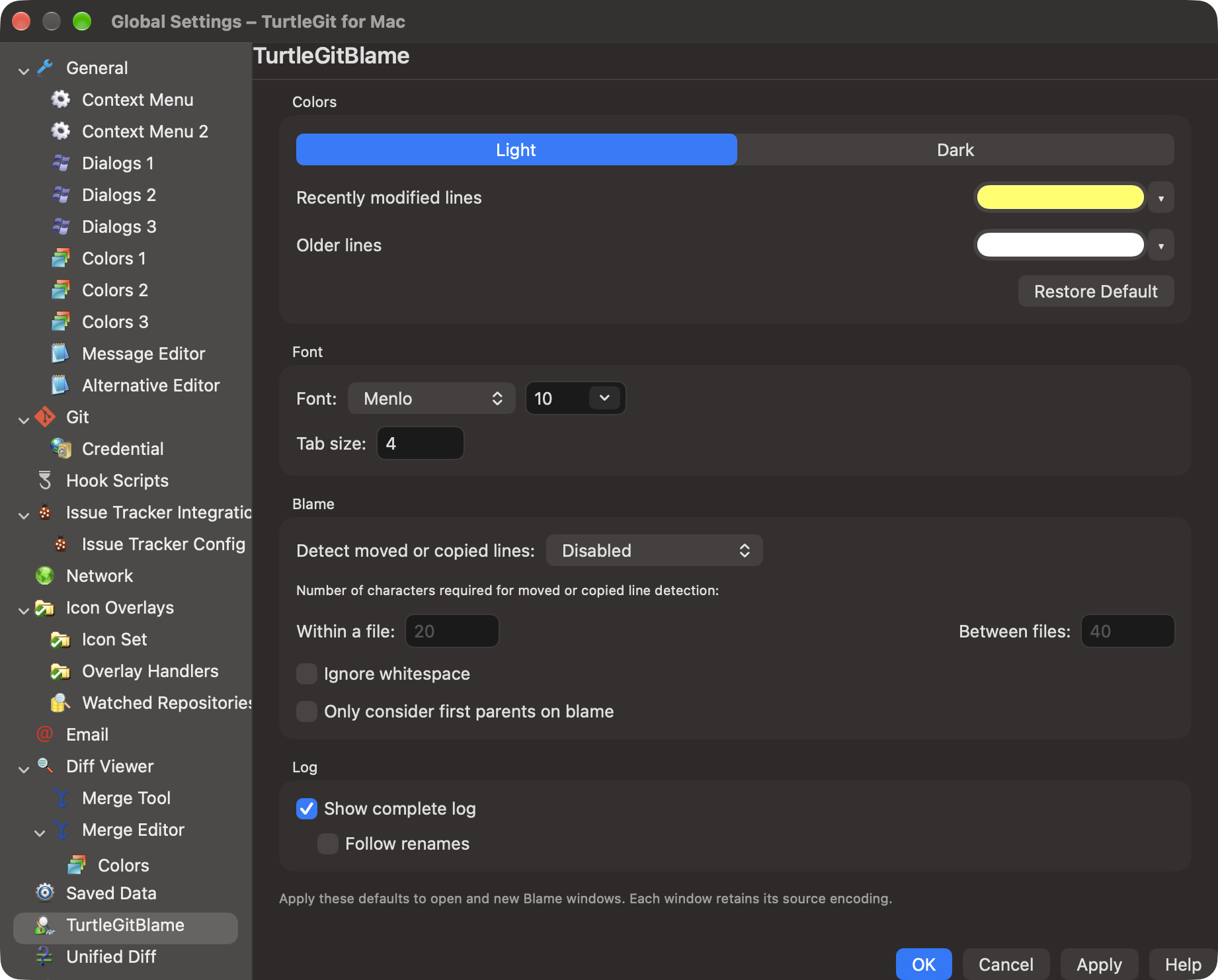
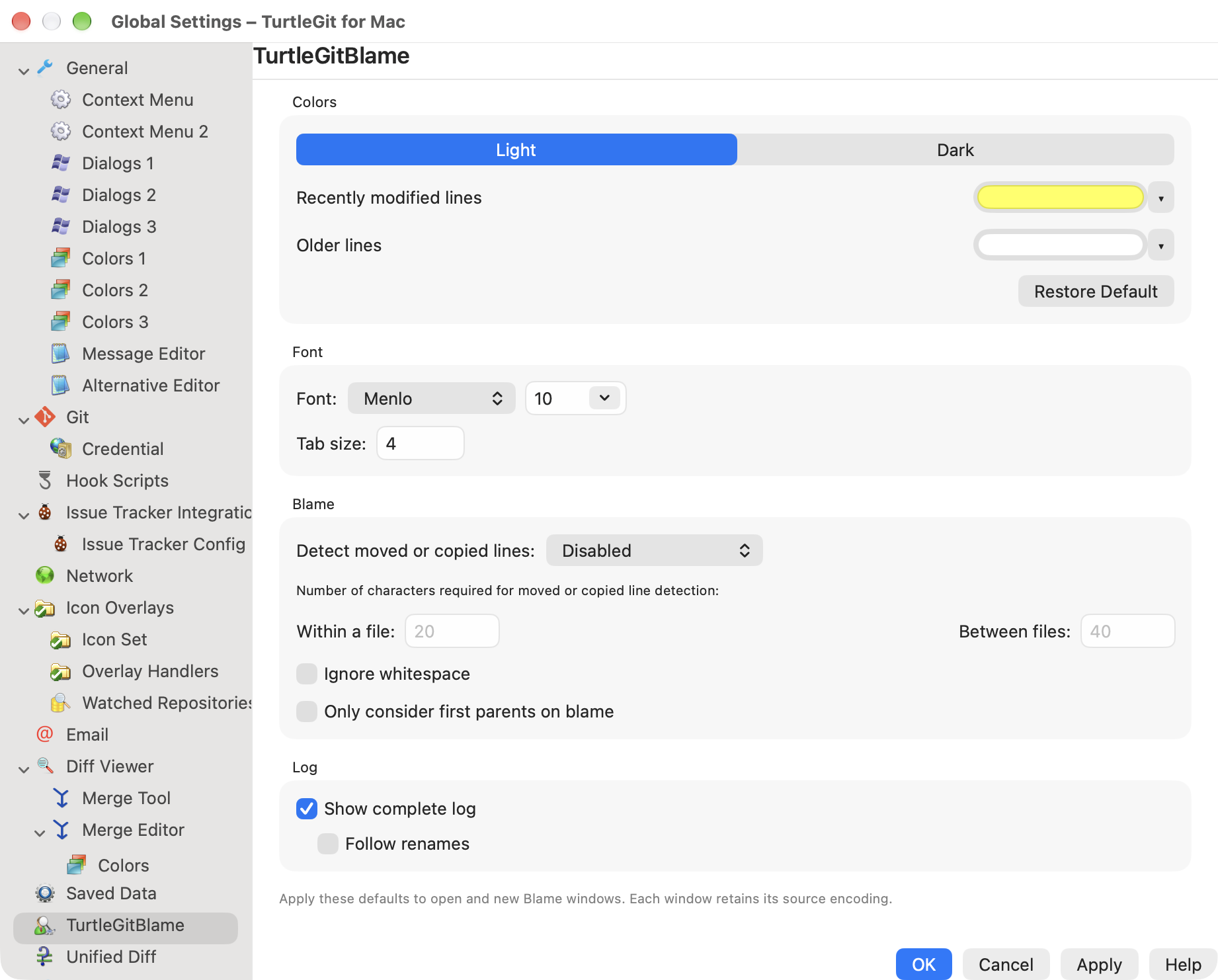
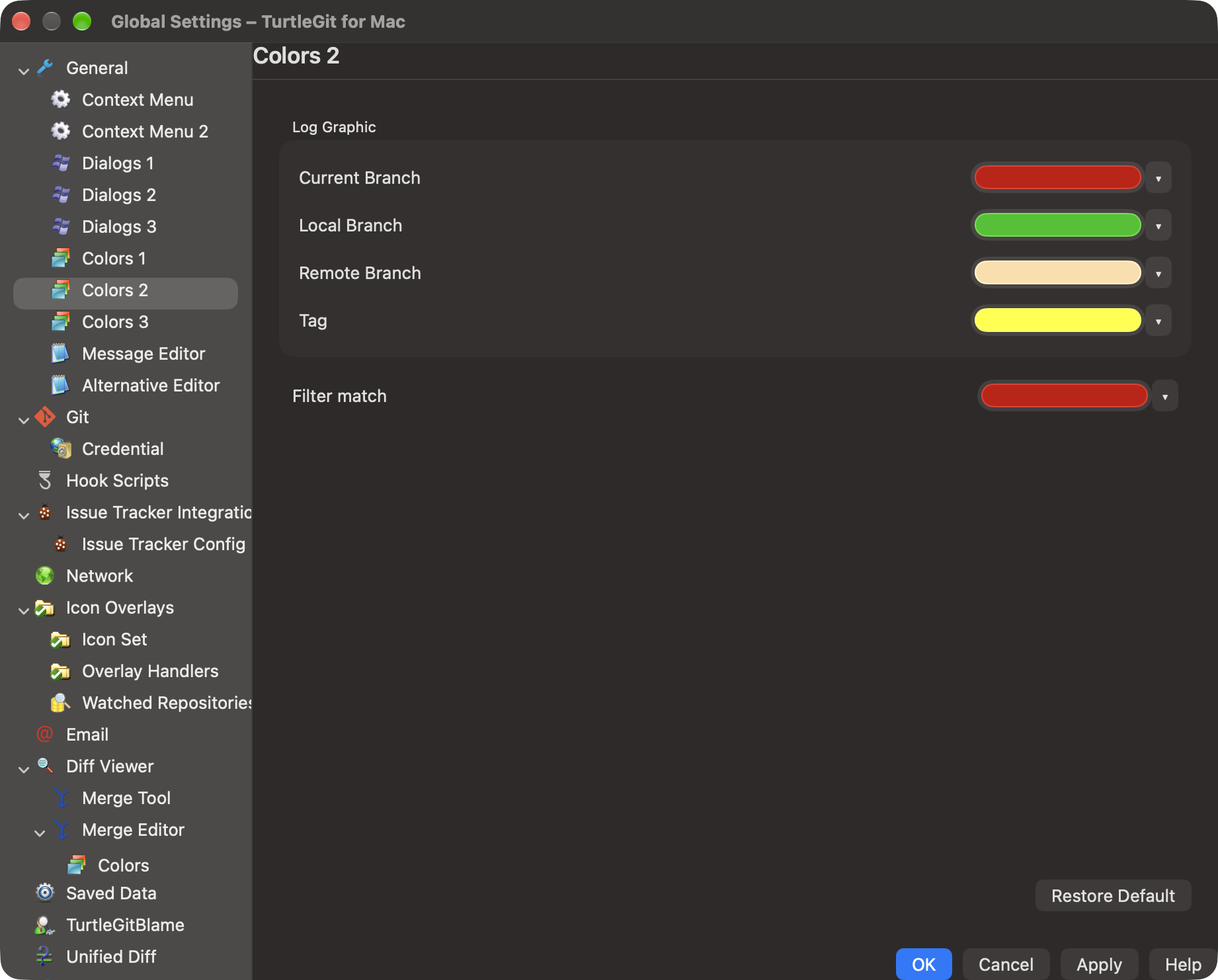
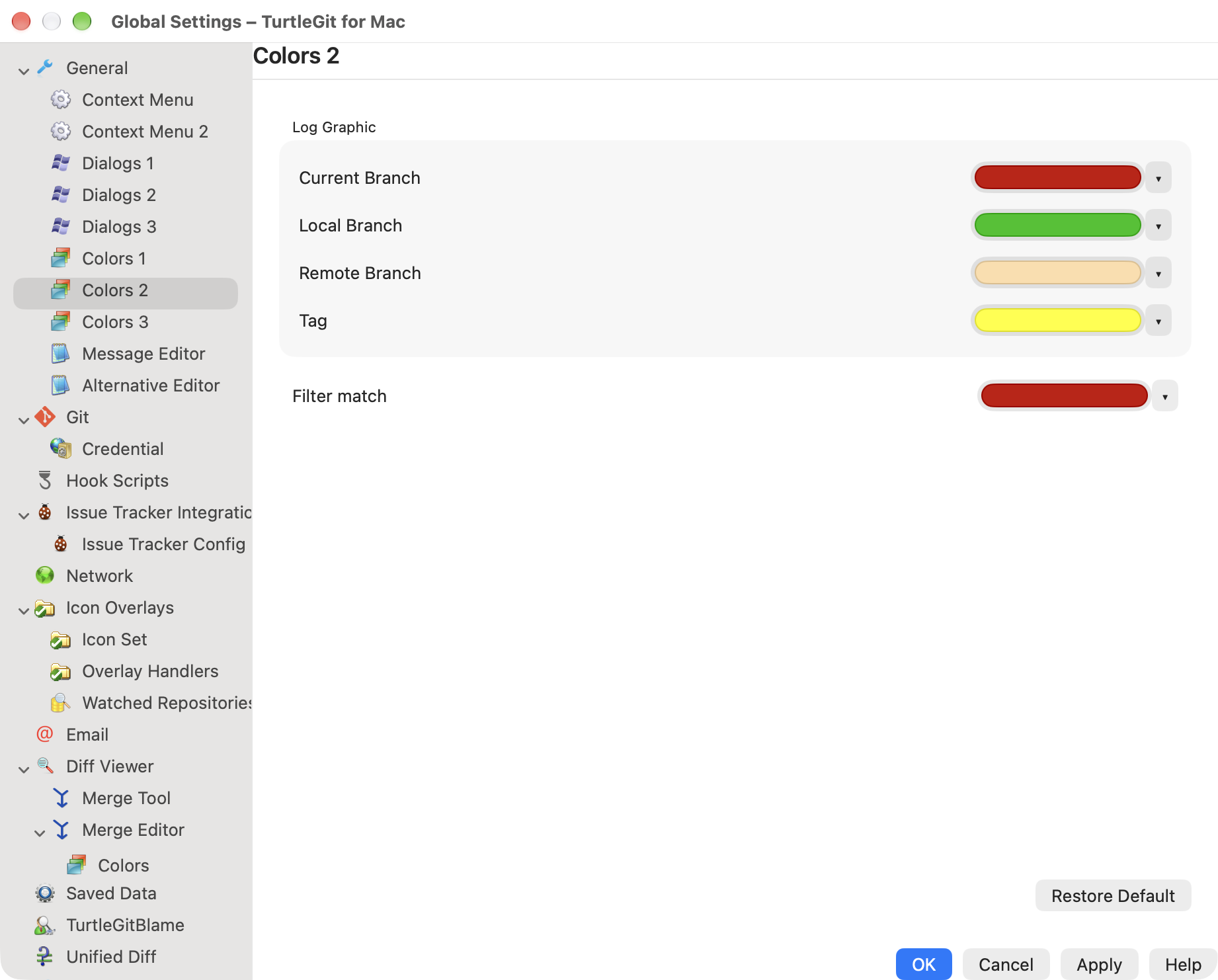
Colors 1, 2 and 3, Blame and Unified Diff now use the source-style native swatch with an Automatic / More colors… menu. Status/reference/lane row labels and their separate swatches follow the source pages; per-row extra Default buttons are replaced by Automatic. Page-wide Restore Default remains. Automatic shows its role's default swatch and edits only that channel/palette draft; Apply and Cancel remain owned by the shared Settings transaction. Existing source RGB defaults, status dark conversion, graph dimensions and renderer notifications are retained.
The same native control serves Merge Colors. Each page/channel has a stable accessibility identifier. Native wells use opaque sRGB. More colors owns the shared RGB-only AppKit panel; switching away, disabling the control or closing its owner releases that ownership. Detached, disabled and retired controls refuse late menu and color actions. An inactive control does not dismiss another well's panel. Cached pages can reattach with their existing drafts. Blame and Unified Diff use explicit native Light/Dark palette selectors independently of app theme. This is the macOS adaptation of the pinned color buttons, not certification of complete physical color-panel, VoiceOver or Windows color-management parity.
The shared source color-button family passed native Settings draft/panel checks; see dated evidence for fixture repairs, exact scope and remaining navigation/physical acceptance.
The reviewed source resources are IDD_SETTINGSCOLORS_1, IDD_SETTINGSCOLORS_2,
IDD_SETTINGSCOLORS_3, IDD_SETTINGSTBLAME, IDD_SETTINGSUDIFF and Merge
IDD_SETCOLORPAGE. Captures below show real native windows and private fixture
colors, not complete dialog certification. Existing long sidebar captions still
need layout work; nested Merge Colors heading/scrolling diagnostics are excluded
from this gallery. Light/Dark here denotes window appearance; the palette being
edited remains independently selected.
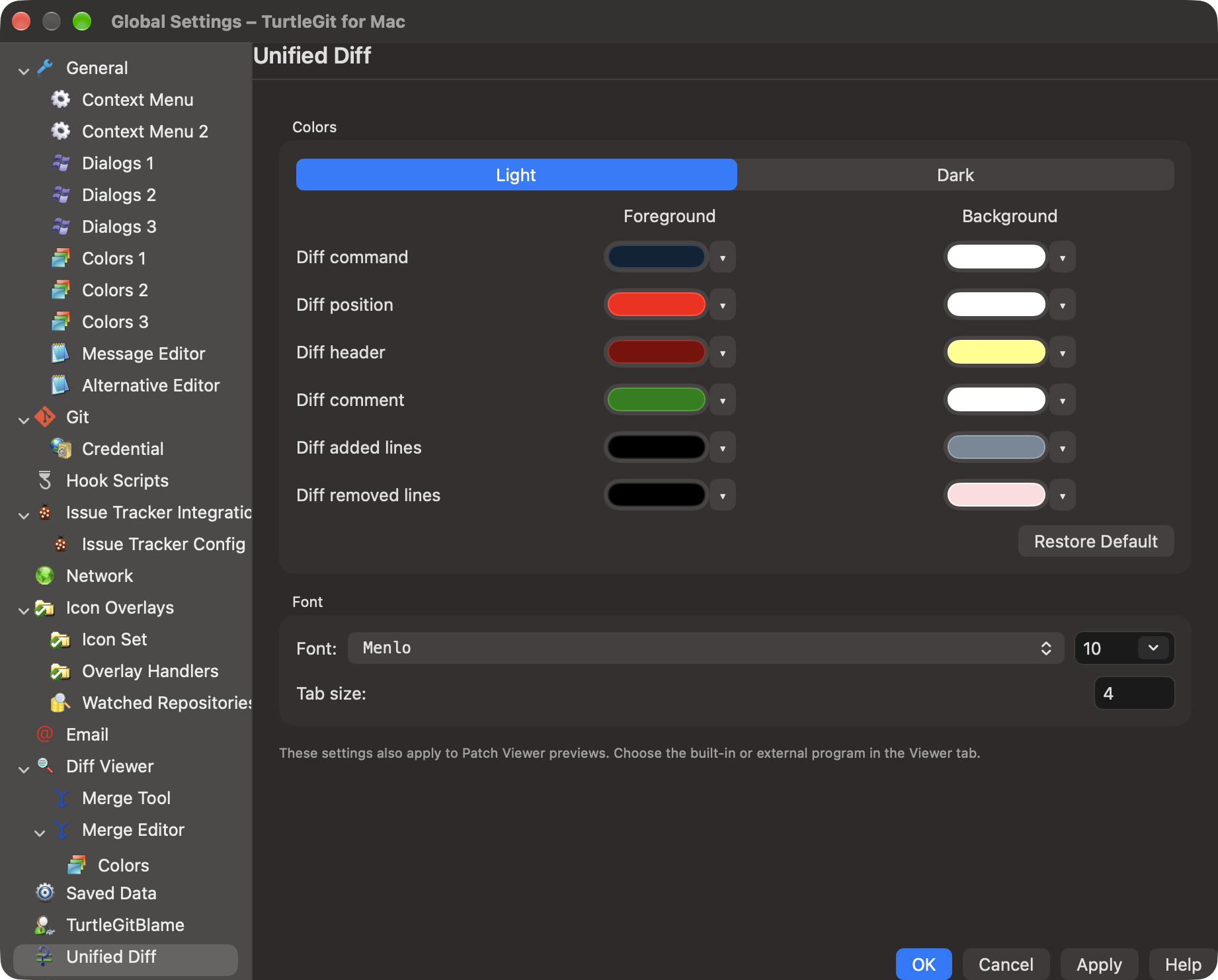
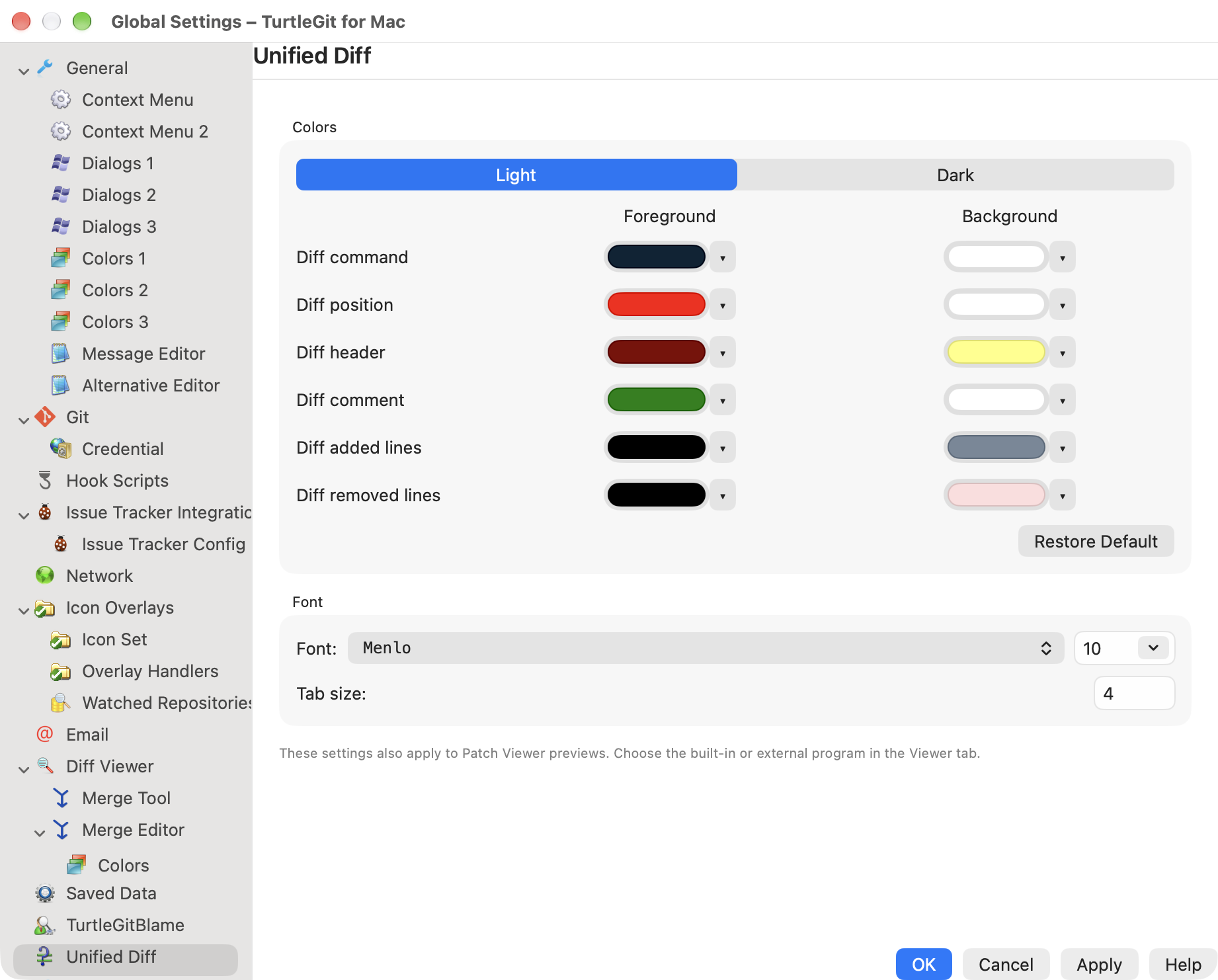
The navigation/layout batch evidence records the initial-size repair, fixture failures, final four-case pass and visual scope. Older color-gallery frames predate the new navigation layout.