 TurtleGit for Mac
Optional comparison and commit interfaces
Classic remains the default for both workflows. The saved application preferences
are TurtleGit.Comparison.CurvedInterface and TurtleGit.Commit.GitGuiInterface.
The comparison preference is shared by two-file and three-way text windows;
changing it does not replace the document or save a file. Commit's alternative
workspace uses the existing Git index and partial-patch backend, with an owned
embedded patch model retired when its window closes or interface changes.
Source comparison
Pinned TortoiseGit baseline: 7338078f8ddd924b8cddee35f512f2286072136d.
src/TortoiseMerge/MainFrm.cpp::OnCreateClient constructs the classic upper
source panes and lower result pane. That layout remains available.
src/Resources/TortoiseProcENG.rc::IDD_COMMITDLG and
src/TortoiseProc/CommitDlg.cpp retain the source's single-list staging toggle
and checked-file commit behavior in Classic. The new interfaces are intentional
Mac alternatives, not claims of additional upstream dialog parity.
The alternative Commit workspace reuses source status artwork, separate index and working-tree snapshots, stale-patch checks, serial repository operations, identity/hooks/preflight and owned progress. It shows staged and unstaged lists, whole-file Stage/Unstage, line/chunk actions, message and Amend. It does not copy Git Gui's menu system. Classic-only options remain accessible by switching back.
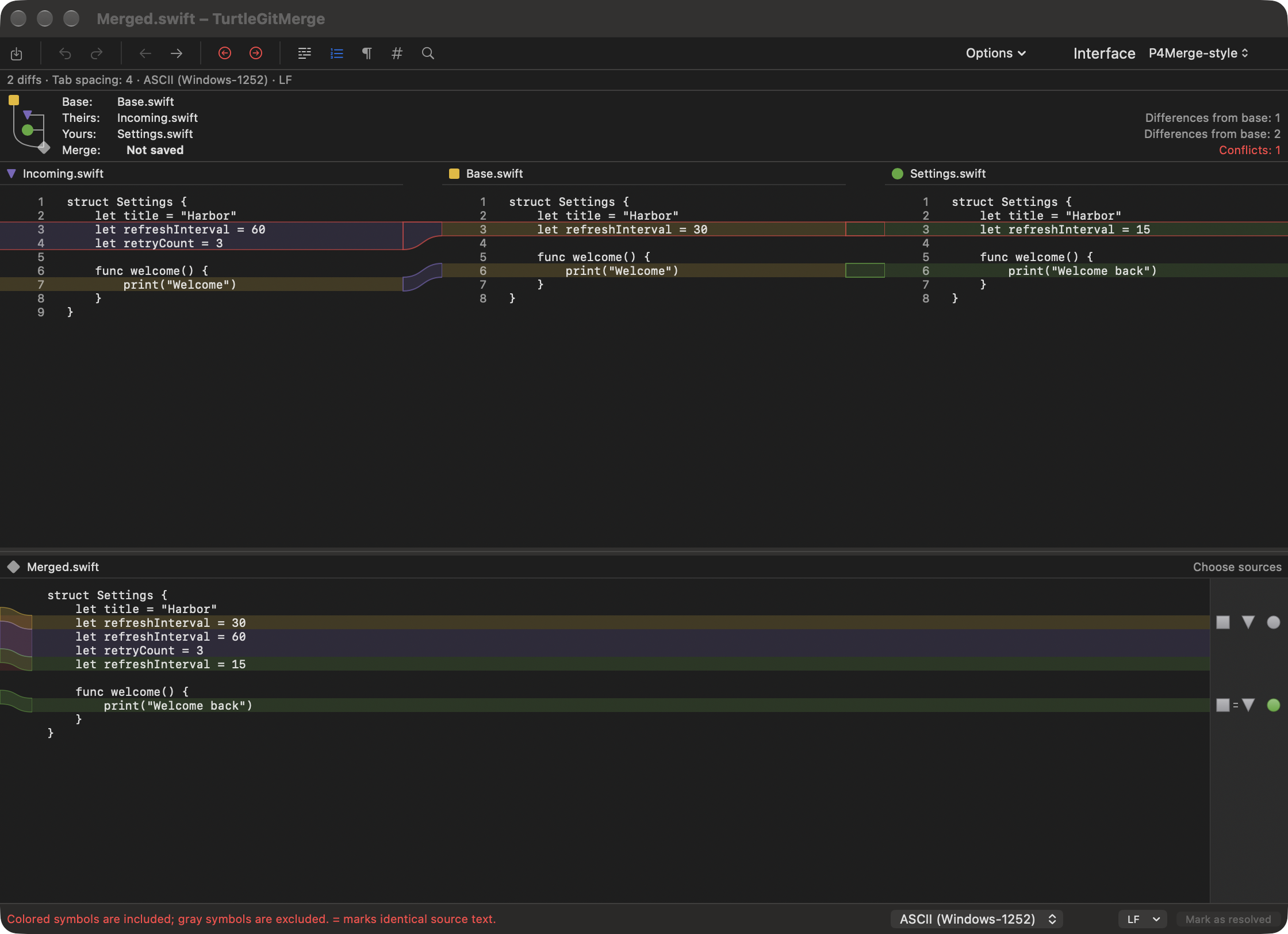
Four-pane merge presentation
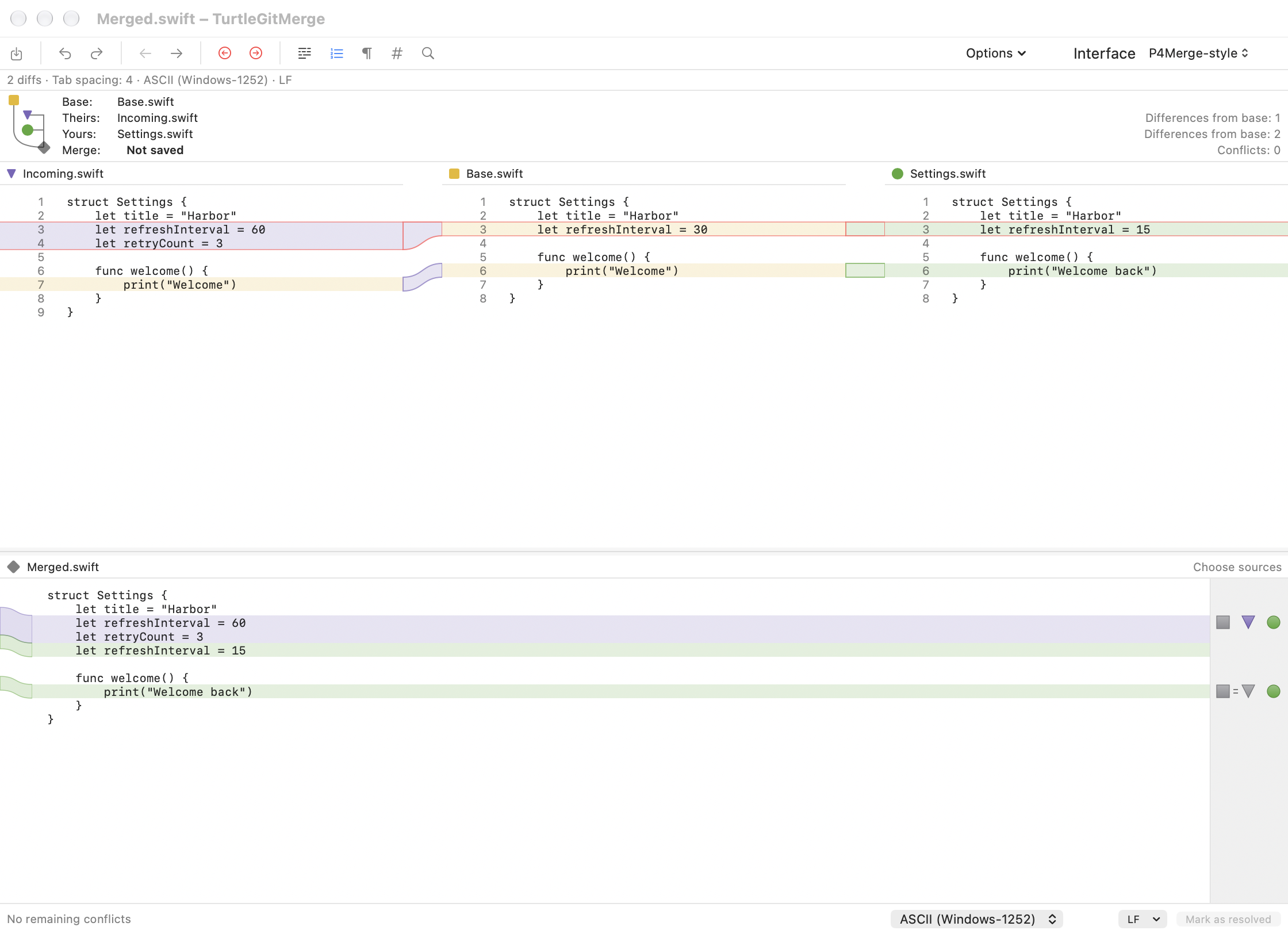
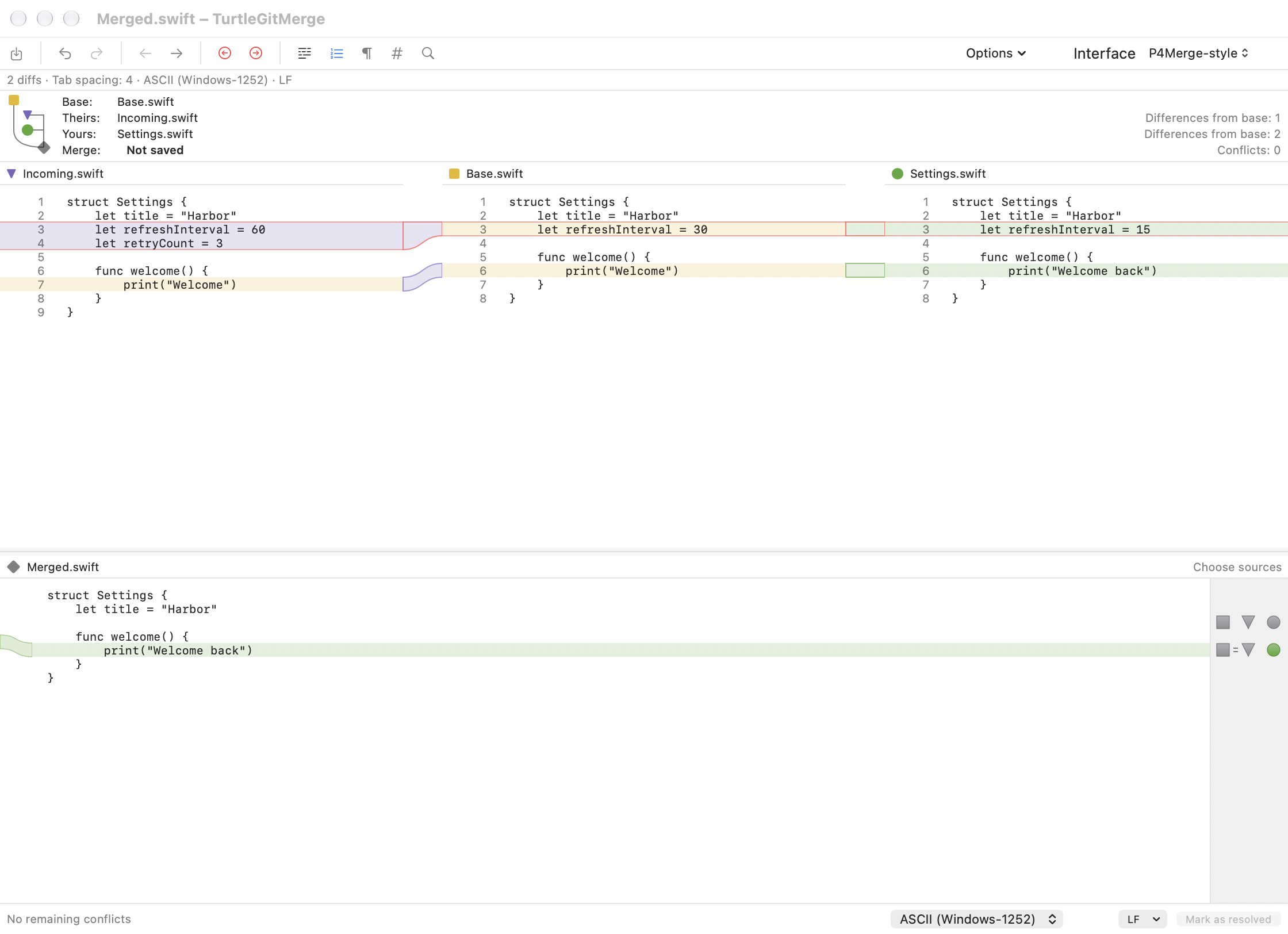
The comparison option now uses Theirs, Base and Yours in the upper band and an editable result below. This corrects the initial side-by-side-result layout. The native toolbar is replaced locally with a compact command row, source diagram, file/merge status, whole-source choices, and a saved source/result divider. Purple/yellow/green source shapes and pale bands follow Perforce's documented scheme. Each source displays original lines; connectors use diff3's original UTF-16 source ranges and TextKit glyph rectangles, including unequal blocks, empty insertions and independent scrolling. Classic retains its original colors.
The pinned Subversion diff3 plan now retains each original change region and its Base/Theirs/Mine coordinates. Result-region mappings carry ordered source choices inside the existing undoable presentation. Inline buttons include/remove each source independently, combine in click order, and avoid duplicating identical payloads. Whole-file choices include Base. All choices, manual typing, Undo/Redo, Save, read-only and operation ownership use the existing result editor workflow. The compact toolbar, relative file labels, flat headers, colored/gray source toggle symbols, equality groups, change badges and a neutral selector gutter and colored result flow gutter follow the reference screenshots. An explicit display/serialized projection shows unresolved source alternatives without Git marker lines. Save still reads the serialized conflict state. Editing a candidate resolves only that engine region to its visible contents plus the edit; Undo restores both the markers and candidate presentation.
Buttons capture the expected presentation so stale actions cannot replace newer edits. Choices crossing an invalidated mapping are disabled instead of guessing.
References reviewed: Perforce merge guide and its four-pane screenshot.
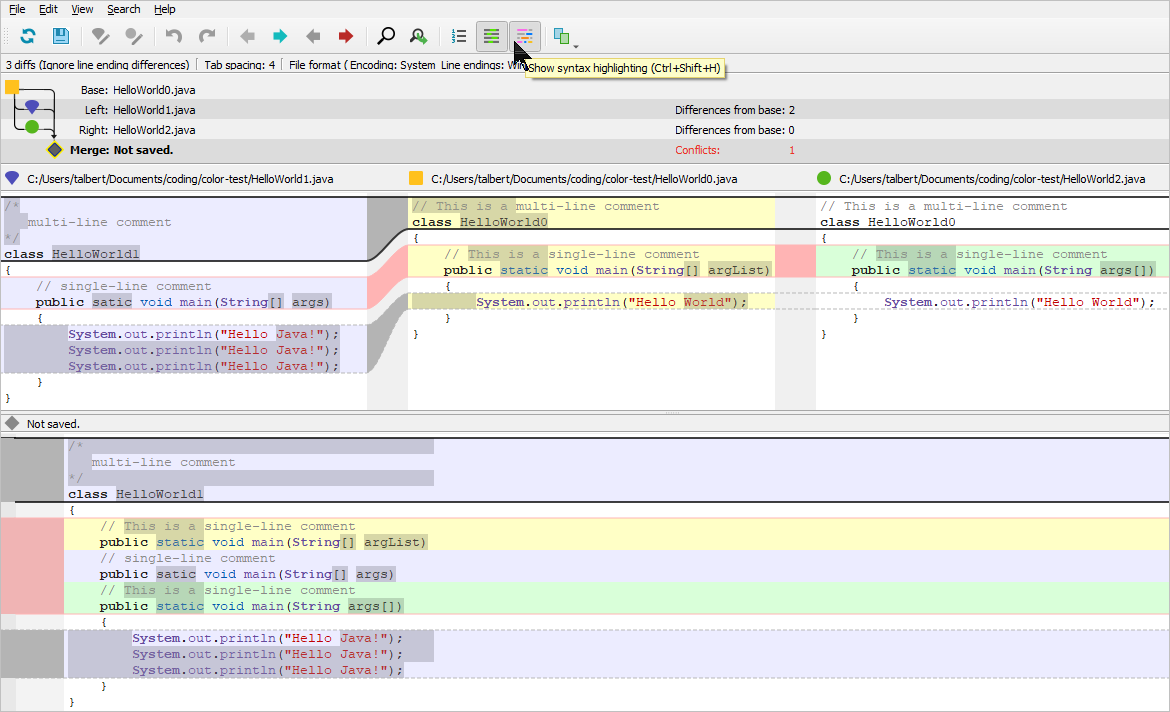
Native captures
Actual inactive native windows using disposable Swift input files:
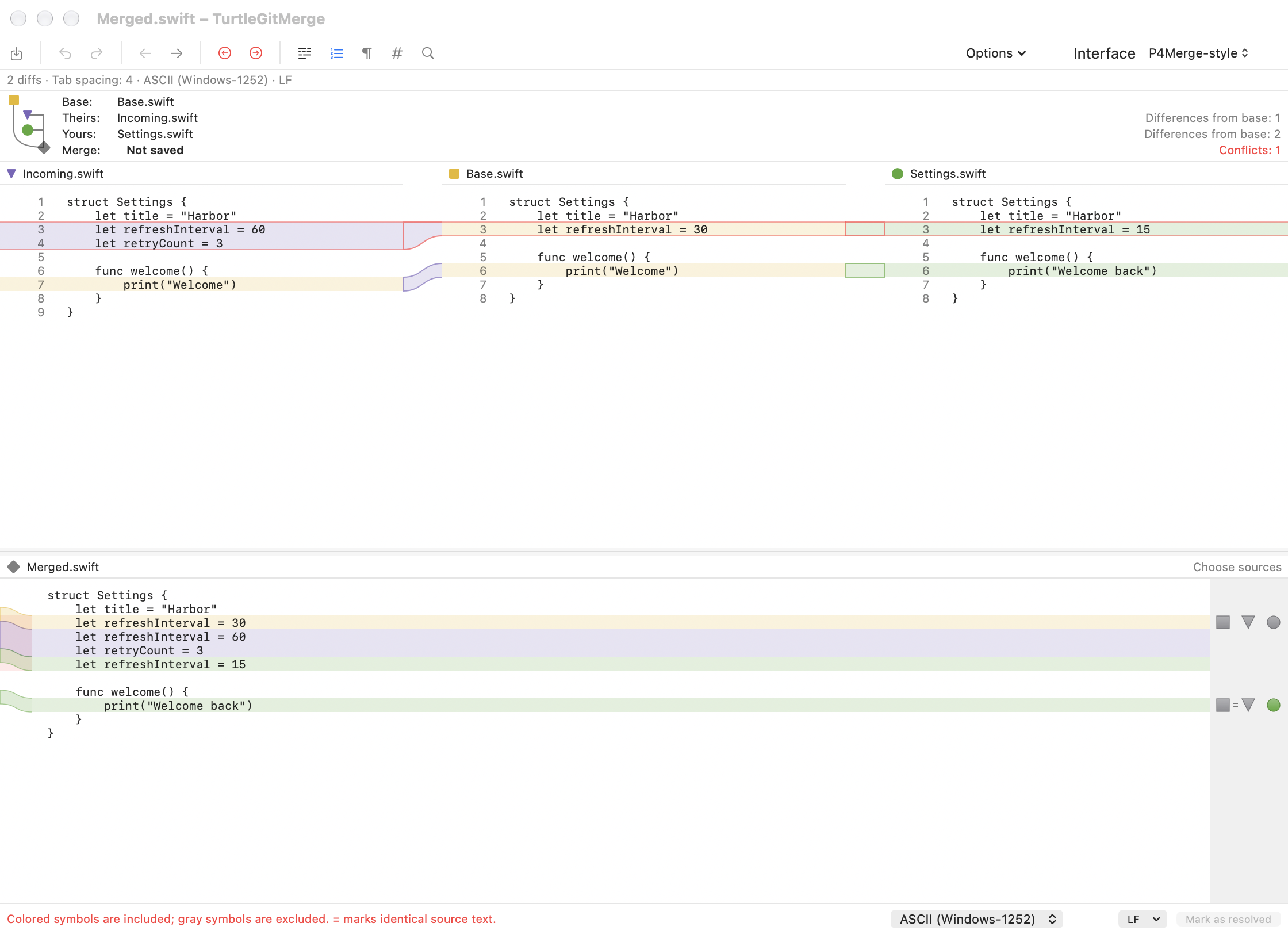
After including Theirs and Yours · With all conflict alternatives deselected · Unresolved dark appearance
Remaining behavior and acceptance
- The layout, source colors and chunk-selection workflow follow the reference; not every P4Merge menu, syntax language, gesture or theme is reproduced.
- Unresolved result blocks use a lossless candidate projection and the existing save checks. Perforce's proprietary rendering and internal format are not used.
- Edits crossing engine-region boundaries can invalidate exact selection maps. Those source choices are disabled until Undo/reload restores the map.
- The source panes scroll independently, with actual connectors and shared previous/next-region navigation. Very dense overlapping chunk controls do not yet provide Perforce's expandable compact selector.
- Full physical keyboard, VoiceOver, multi-display resizing and signed App Store acceptance remain open. Focused local checks do not prove full hosted CI.
- Commit issue-provider, author/date and branch options use Classic; the alternative intentionally presents a smaller set of commit controls.
See getting started and merge tool for use.